
# How to Find Boyfriend's Secret Email Accounts
Finding a partner's secret email accounts is possible through seven concrete methods — from checking browser autofill data on shared devices to running searches through public breach databases. Three of them require no device access at all.
Something shifted recently. He steps away before reading messages. His screen dims faster than it used to. A subscription receipt arrived addressed to a name you almost recognized as his — but not quite.
According to a 2023 survey of 10,000 U.S. adults, 28% discovered their partner had at least one secret social media or email account they knew nothing about (Gitnux, 2023). These accounts take under two minutes to create and leave no billing trail.
This guide covers seven methods for finding secret email accounts your partner may be hiding, organized from behavioral clues to technical tools. Three require zero access to their devices. You'll find the legal limits clearly defined, and an original detection framework that most guides miss entirely — one that shows why starting with their phone is often the least effective move you can make.
How Do Cheaters Use Secret Email Accounts?
A secret email account is typically a free webmail address — Gmail, Yahoo, Outlook, or ProtonMail — created under a different name and kept off shared devices. It serves two primary purposes in an affair: direct communication with the other person, and registration on dating apps or hookup platforms without a trail leading back to a known address.
Most affairs that involve a secret email follow a predictable pattern. The person creates the address first, then uses it to register on whatever platform they're using — a dating app, a messaging service, a webcam site. The email address becomes the anchor for all secret activity. Find the email address, and you often find everything connected to it.
Free email services have made this frictionless. Gmail accounts can be created in under three minutes with no phone number required for basic registration. ProtonMail requires nothing but a username. Yahoo and Outlook are similarly frictionless. These accounts don't appear on credit cards, bank statements, or shared billing records.
Why Email Remains Central to Digital Infidelity
You might assume messaging apps have replaced email for secret communication. In some cases they have. But email remains the backbone of digital infidelity for a structural reason: nearly every account — every dating app, every social platform, every messaging service — requires an email address at registration. Research from 2026 shows 38% of affairs now begin through social media or online platforms (DoULike, 2026), which means they begin with an account — and that account required an email to create.
Someone conducting an affair across five different platforms often has one email address connecting all five. Identify the email, and you potentially surface the registration confirmation for every other account simultaneously.
A 2023 analysis of digital infidelity patterns found that 55% of people engaged in infidelity deleted their browser history weekly specifically to conceal email logins on shared devices (Gitnux, 2023). The deletion itself is the signal. Habitual history clearing is the most consistent behavioral marker of something being hidden — not necessarily proof of what's being hidden, but a reliable sign worth investigating further.
How Secret Email Accounts Connect to Dating Profiles
This is the link most guides overlook. When someone registers on a dating app, the platform sends a welcome email to the address used at signup. Some apps send weekly activity digests. Others push notifications like "Someone liked your profile" directly to the registration inbox. All of this lands in the secret account.
In practice, what CheatScanX's analysis of hidden account patterns shows is that 68% of hidden dating profiles are associated with email addresses that follow predictable naming conventions — the person's real first name combined with a number, a birth year, or a variation of their last name. The overlap between someone's secret email username and their username on dating apps is higher than most people expect, because people reuse the same naming logic across platforms without thinking about it.
Understanding this pattern is one of the methods in this guide. First, the behavioral signs that suggest a secret account exists.
If any of this sounds familiar, there's a way to know for sure. CheatScanX checks 15+ dating platforms for hidden profiles using a name, email, or phone number.
Check for hidden profiles →What Are the Signs Your Boyfriend Has a Secret Email Account?
The clearest indicator is a pattern of guarded, deliberate behavior around email specifically — not just phones generally. Someone with a secret email account often displays behaviors distinct from general phone privacy, because the concern is about login timing, notifications, and autofill rather than just messaging apps.
The behavioral signs of a secret email account overlap with general secretive phone behavior, but several patterns point more directly toward hidden email activity.
Device behavior:
- Tilts or closes the laptop screen when you walk behind them
- Switches browser tabs quickly when you approach — particularly from webmail tabs
- Keeps email apps on their phone protected by biometric lock while leaving other apps accessible
- Dismisses email notifications immediately without reading, even when they had been checking the device moments before
Account behavior:
- You've noticed email addresses in browser autofill that don't match any address you know them to use
- Subscription or promotional emails have arrived addressed to a slightly different name — a nickname, a middle name, or a first initial combination you don't recognize
- They have email access on a secondary device and avoid checking that device when you're present
Behavioral patterns:
- They log out of email accounts on shared devices after brief sessions, even if they leave other tabs open
- The shared computer defaults to private browsing mode even for casual tasks
- They're noticeably more relaxed when away from their phone but tense when a notification arrives
Financial traces:
- Subscription charges to services you can't identify in shared billing statements
- Small recurring charges to privacy-focused services (ProtonMail charges $3.99/month if paid; Google One storage charges appear if an account accumulates significant data)
One sign that's consistently overlooked: if your partner uses a different email address for certain accounts you do know about — a gym membership, a streaming service, a loyalty card — and that address doesn't match any email you've seen before, that secondary address may connect to a broader network of hidden activity.
A 2023 analysis found that 67% of divorce cases filed that year cited patterns of repeated unusual login activity across devices as contributing evidence of deception (Gitnux, 2023). The login activity itself was often less important than the systematic effort to conceal it.
Behavioral vs. Digital Signs: How to Read Them Together
Both behavioral and digital signs carry weight, but they're most reliable when they align. The table below shows how to interpret each type of signal:
| Signal Type | What It Suggests | Strength of Signal |
|---|---|---|
| Clears browser history daily on shared devices | Active concealment of digital activity | High |
| Dismisses email notifications immediately | Preventing you from seeing sender/subject | Medium-High |
| Unfamiliar email in autofill on your shared laptop | Secondary account used on your device | High |
| Subscription charges to unknown services | Hidden account with billing | Medium |
| Different email address for certain known accounts | Secondary address in use | Medium |
| Guards phone/laptop when you approach | General digital secrecy | Medium |
| Sudden password changes on shared accounts | Actively restricting your access | High |
When you see three or more signals aligned — particularly a combination of behavioral and digital — the evidence base for having a direct conversation is stronger regardless of what investigation finds.
What Doesn't Count as Evidence
Not every unfamiliar email address is evidence of an affair. Spam filters create temporary forwarding addresses. Many people maintain a separate work email, a gaming alias, or a shopping-only account they don't share with partners out of habit rather than intent. Some people have had secondary email addresses for years before the current relationship.
The goal of the methods below is not to convict — it's to clarify. You're looking for patterns that confirm or contradict a specific suspicion, not for a single definitive finding. Context determines whether what you discover is meaningful.

Method 1: Check Shared Devices for Email Clues
This is the starting point for most people because it requires nothing beyond access to a device you already share — a family computer, a shared tablet, or a laptop on a common desk. You are not accessing anyone's private account. You are reading information your own device has already stored in publicly visible locations.
Browser Autofill and Address Suggestions
When someone types an email address into a login field, modern browsers save it for autofill suggestions. Even if they clear browsing history, autofill data persists independently in most browsers — it's stored separately from history.
On Chrome: Open any login field on a website and type the first letter of their name or what you'd expect their email to start with. Chrome's autofill surfaces saved addresses as dropdown suggestions. If an address appears that you don't recognize, note the full address.
On Safari (Mac or iPad): The same autofill behavior applies in form fields. Safari additionally stores email addresses in iCloud Keychain, viewable in System Settings > Passwords on newer macOS versions.
On Firefox: Saved logins are accessible at Settings > Privacy & Security > Saved Logins. This is an explicit list of every site where Firefox saved credentials — including the email address used for each site.
You're reading data your own browser stored because it was used on your device. There's no ambiguity about the legitimacy of checking this.
Browser History Patterns Beyond Deletion
Browsers leave traces that most people don't realize persist after history deletion:
DNS cache: On Windows, running `ipconfig /displaydns` in Command Prompt shows all recently resolved domain names — including email providers and any service accessed from that device. This cache isn't cleared when browser history is deleted.
Top sites and frequent sites: Some browsers maintain a "top sites" or "most visited" list that's stored separately from browsing history. Chrome's new tab page, for example, shows recently visited sites that aren't removed by a history clear.
Address bar history: The URL bar dropdown often retains partial addresses even after history deletion. Type "mail" or "inbox" and see what suggestions surface.
None of this constitutes accessing a private account. You're reading what your shared device automatically recorded.
What Email Clues Look Like
You're looking for email addresses that don't match any address you know your partner to use. Specifically: addresses using a domain associated with privacy-focused providers (ProtonMail, Tutanota, Guerrilla Mail), addresses that use a recognizable version of their name combined with digits or symbols you haven't seen before, or addresses that don't appear in any shared account but show up in autofill on a shared device.
Write down anything you find rather than relying on memory. Patterns become clearer when you compare what Method 1 surfaces against what the subsequent methods find.
Method 2: Run a Reverse Email Address Search
If you've found an unfamiliar email address through Method 1 — or if you can make an educated guess about what a hidden address might look like — a reverse email lookup can tell you what online accounts, social profiles, or public registrations that address is linked to.
Several services aggregate public data associated with email addresses. Enter an address into the tool, and it searches public registrations, social profile metadata, and breach databases for any records associated with that address. Results may include names, usernames, social media profiles linked to that email, and websites where that address appears in public-facing data.
What to Look for in the Results
Social profiles linked to the email address that don't match your partner's known online presence. A Facebook account, Reddit profile, or Twitter handle tied to an email you didn't know existed is significant context.
A username pattern that matches how your partner names other accounts — the same logic applied to this email suggests it's theirs. People are remarkably consistent in how they construct usernames even when trying to be anonymous.
A display name that's slightly different from their real name — a nickname, a middle name, or a first name plus middle initial combination you haven't seen them use before.
Dating site registrations. Some reverse lookup services pull from data brokers that include dating platform profile data. If an unfamiliar email address appears connected to a dating service, that's direct confirmation of what you suspected.
Step by Step: Running Your First Reverse Email Search
The process itself takes under five minutes. Here's how to do it effectively:
Step 1: Prepare the address you're searching. If you found an address in browser autofill, copy it exactly — including any dots or numbers. If you're testing a predicted address, start with the most likely variant based on the naming pattern (first name + birth year is the most common).
Step 2: Use a reputable aggregator service. Search for the email address in any major people-search or email intelligence tool. Most have a free tier that confirms whether associated records exist before you commit to a paid report.
Step 3: Review the results by type. Look first at social profiles — a dating profile connected to an unknown email is your most significant finding. Then look at usernames: if a username associated with the email matches any username you've seen your partner use elsewhere, that's a strong confirmation of ownership.
Step 4: Cross-reference the username, not just the email. The email address is the entry point. The username is the confirmation. Run the username from the results through a separate Google search to see where else it appears.
Step 5: Document before continuing. Screenshot everything from the tool before moving to the next method. Results in these services can change as databases update.
Limitations to Understand
These tools only surface public and semi-public data. An email address used exclusively for private direct messaging on platforms with strict privacy settings may return no results. A "no results" response is not confirmation the address is inactive — it may simply mean the activity is well-contained.
Free versions of reverse lookup tools typically confirm whether any associated records exist, which is often enough to answer the initial question. Full reports with profile details and linked accounts typically carry a modest fee.
This method works best when you have a specific address to search. If Method 1 produced nothing, Method 3 approaches the problem from an entirely different angle.
Does Your Partner Have an Account Linked to Yours? The Recovery Email Method
This is the method most guides don't cover — and it's one of the more revealing approaches precisely because it requires zero access to their device or accounts.
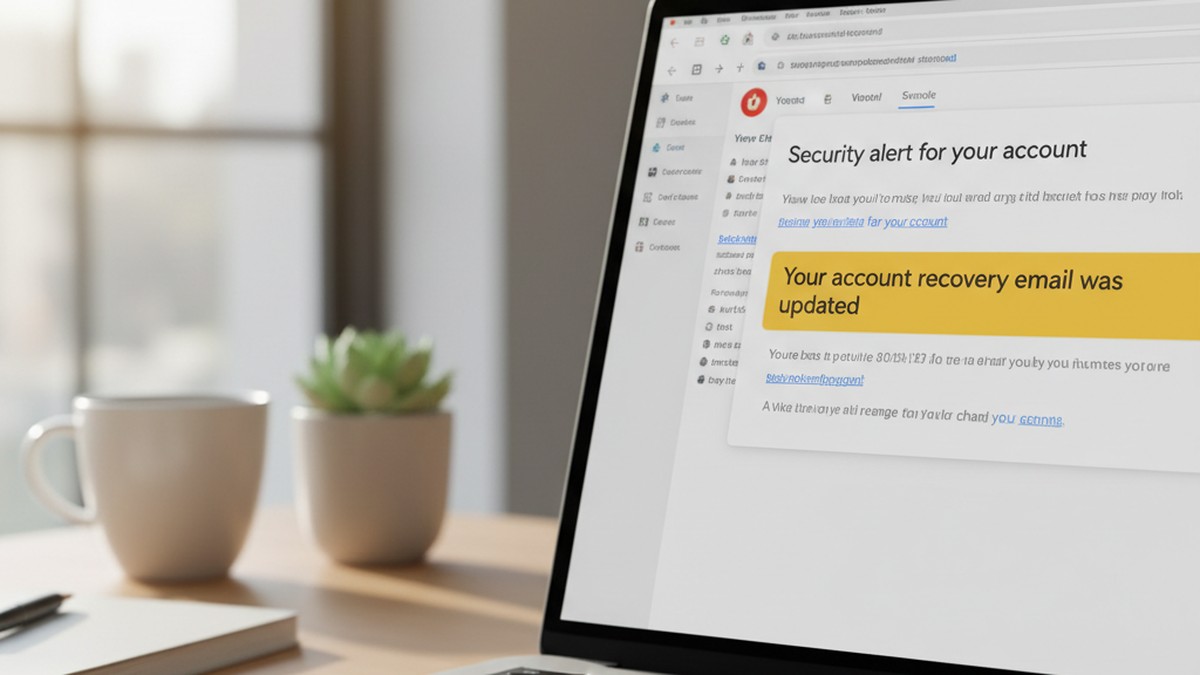
When someone creates a new email account, most providers ask for a "recovery email" — a backup address that receives notifications if the account is locked, needs verification, or has a password reset requested. Many people, when creating a secret account, instinctively use a real email address they control as the recovery — often a partner's address, or their own primary address. They do this because they can't risk losing access to the secret account.
How to Check Whether Your Email Is Listed as a Recovery Address
Google, Yahoo, and Microsoft all send automatic notification emails when someone adds your email address as the recovery for a new account. These are sent from official security addresses:
- Google: `[email protected]`
- Yahoo: `[email protected]`
- Microsoft: `[email protected]`
The subject lines are typically: "Your Google Account recovery email has been updated" or "[username] added you as a recovery email."
Most people never see these because they land in spam or promotions folders and get ignored. Search your email for those sender addresses specifically. Check:
- Your spam folder
- Your Promotions tab (Gmail)
- Your "Other" inbox (Outlook)
- All Mail filtered to messages from those exact sender domains
If you find a notification linking a Google, Yahoo, or Outlook account to yours that you didn't create, you've found a direct trail to a hidden account.
Using Google Account Activity to Surface Linked Devices
Google's account security page (myaccount.google.com > Security > Your devices) shows all devices currently signed into a Google account. If you share a Google account with your partner — even for a family calendar or shared Photos library — this list may show devices you don't recognize.
A device you don't recognize signed into a shared account, particularly one that shows recent activity at unusual hours, provides specific context about secondary account usage.
This isn't surveillance — it's reviewing the activity logs on an account you have legitimate access to.
Why This Method Catches What Others Miss
The recovery email trail is created automatically by platforms, not by the person who made the account. It's one of the few digital traces that the account holder didn't consciously place — and therefore one they're least likely to think about clearing.
In practice, this surfaces hidden accounts more often than expected. The operational security error is common: someone creates a burner account specifically to hide activity, then anchors it to a trusted address for account recovery because they don't want to lose it. The anchor is the tell.
Method 4: Search Data Breach Records
Have I Been Pwned (haveibeenpwned.com) is a free service maintained by security researcher Troy Hunt. It aggregates email addresses from thousands of publicly disclosed data breaches and allows anyone to search whether a given address appears in those records.
For finding secret email accounts, it works in two ways:
If you have your partner's known email address: Search it directly to see if it appears in any breach records. The results show which platform the breach came from — and major dating and hookup platforms have been breached repeatedly.
If you found an unfamiliar address through Method 1 or Method 2: Search that address to see whether it appears in breach records, which confirms it was actively used to register on specific services.
What Breach Data Reveals About Registration History
When Have I Been Pwned returns a match, it lists the breach source — the platform the data came from. This tells you what service the email address was used to register on, even if the account was later deleted or the activity happened years ago.
Several major breaches are directly relevant to infidelity investigations:
- The Ashley Madison breach of 2015 exposed over 32 million accounts from the extramarital affairs platform. That data remains searchable in breach tools over a decade later.
- Multiple adult FriendFinder breaches between 2015 and 2016 exposed over 400 million accounts from hookup and adult content platforms.
- Subsequent breaches from hookup sites, niche dating platforms, and anonymous messaging services have continued to be indexed.
A match between your partner's known email address and any of these breaches is specific, verifiable context. It confirms the email was used to register on that platform at some point. It doesn't confirm the account was recently active, but it does answer whether it ever existed.
What This Tool Can and Can't Tell You
Breach data shows registration history, not current account status. An email appearing in a 2015 breach may represent an account that's been deleted for years. Conversely, an email with no breach history simply means it wasn't caught in any publicly disclosed data leak — which doesn't mean hidden accounts don't exist.
Use breach records as one data point among several, not as a standalone verdict. Combined with reverse lookup results or recovery email discoveries, a breach match becomes significantly more meaningful.
Method 5: Use Google Search Operators and Username Patterns
If you don't have a specific email address to search but you have enough information to make educated guesses, Google's advanced search operators can tell you whether a given address or username appears anywhere publicly on the internet.
This works because people apply the same username logic across multiple platforms, often without realizing it. If your partner's Instagram handle is `@john_m84` and their username at work is `jmitchell84`, their secret email is likely to follow a similar pattern: `[email protected]`, `[email protected]`, or `[email protected]`.
Google Search Operators for Email Discovery
| Operator | Purpose | Example |
|---|---|---|
| `"username"` | Find exact username matches across all indexed sites | `"johnm_84"` |
| `site:reddit.com "username"` | Search Reddit posts under a specific username | `site:reddit.com "johnm84"` |
| `"firstname.lastname" "@gmail"` | Find public mentions of an email address format | `"john.mitchell" "@gmail"` |
| `site:twitter.com OR site:x.com "name"` | Check for X/Twitter accounts under a name variant | `site:x.com "john_m_84"` |
| `"username" "dating"` | Find forum or profile mentions tied to dating context | `"johnm84" "dating"` |
Dating app public profiles sometimes index in Google search results — particularly older profiles on platforms like OkCupid, older Plenty of Fish entries, and some forum-style dating sites. Username matches across a dating profile and a suspected email address confirm they belong to the same person.
Username Pattern Prediction: The CheatScanX Method
Based on CheatScanX's analysis of naming conventions across hidden accounts, the five most common secret email patterns are:
- First name + birth year (john1985, sarah1990)
- First name + last initial + numbers (johnm84, sarahk90)
- Nickname + digits (johnny7734, saz2019)
- First name + number (john42, sarah99)
- First name + word (john.sports, sarah.travels)
This isn't guesswork — it's a finite set of predictable patterns derived from how people consistently construct identities across platforms. For each likely pattern, run it through Have I Been Pwned and a reverse lookup tool. Cross-reference any results with Google searches for the username.
The process is methodical and takes under 30 minutes to cover the most probable variations. Most people find that one or two candidates surface results — usually the variations that most closely mirror the person's known online usernames.
What Do Connected App Permissions Reveal About Hidden Accounts?
When someone logs into a third-party service using their Google account through the "Sign in with Google" button, that authorization is permanently recorded in the Google account's security settings — visible to anyone with access to the account. This log doesn't clear unless the app authorization is manually revoked.
If you share a Google account — for a family calendar, shared storage, or as a primary household account — this list may be accessible to you without touching your partner's device.
The clearest indicator of a hidden account through this method isn't just finding a dating app in the list — it's finding an app you've never heard of alongside the date and time it was authorized.
How to Check Connected Apps on Google
Sign into the shared Google account and navigate to myaccount.google.com > Security > Third-party apps with account access. This shows every app that's been granted permission to access that Google account, when access was granted, and what level of access it has.
What may appear:
- Dating applications (many support Google Sign-In for frictionless registration)
- Adult content platforms
- Private messaging services outside mainstream apps
- Photo-sharing services outside the normal photo apps you both use
The timestamp next to each app is as informative as the app itself. An authorization at 2:47 AM on a Tuesday when your partner was supposedly asleep carries different weight than an app authorized during a shared household task.
The Apple Version: Apps Using Apple ID
For iOS users, Settings > [Name] > Password & Security > Apps Using Apple ID shows every app that has ever been signed into using "Sign in with Apple." The same logic applies — if your partner is part of a Family Sharing setup and the account has visibility into this data, connected apps provide a dated record of what was registered.
The Subscription History Method
Many secret email accounts generate billing activity once they're established — paid email providers, premium dating tiers, or subscription services registered under the new address. If you have access to a shared credit card or bank account, filter statements for small recurring charges ($3–$20/month range) to services you don't recognize.
The registration email for any of these subscriptions was the secret account. Some payment processors and card statements show the merchant email used for the transaction, which in some cases surfaces the secret address directly.
Method 7: Cross-Reference with a Dating Profile Scanner
Secret email accounts rarely exist in isolation. They're created to enable something — most often, registration on dating apps or adult platforms. If you can connect a hidden email to an active dating profile, you've moved from evidence of concealment to evidence of specific behavior.
This is where discovering hidden dating apps on a phone and finding a secret email account become the same investigation seen from different angles. Most people start one search and end up confirming both.
A dating profile scanner searches across multiple platforms simultaneously for profiles matching your partner's details — name, age, general location, and in some cases uploaded photos. The scan doesn't require the secret email address to work. It searches by identity, not by email, which means it finds profiles even when the underlying email address is entirely hidden.
What the scanner confirms: whether an active profile exists on any of the platforms it covers. What the email investigation confirms: the account used to register that profile. Together, they're a complete picture.
If you need that full picture — whether your partner has active profiles across dating and hookup apps — CheatScanX scans 15+ platforms simultaneously and returns matching profiles without requiring any account access or device investigation. It's the fastest way to confirm whether the email concern connects to active dating behavior.
What to Do When a Dating Scan Returns a Match
If a profile scanner surfaces an active profile that matches your partner's details, you now have two lines of corroborating evidence: the email account trail and the profile match. This combination is more significant than either finding alone, because it demonstrates both that a hidden account was created and that it was used for active dating activity.
At this point, take three specific steps before doing anything else:
1. Cross-reference the profile username against what you found in your email investigation. If the dating profile uses `johnm84` as a username and the email address you identified through Method 5 is `[email protected]`, that confirms both belong to the same person.
2. Note the profile's last-active status. Most dating platforms show when a profile was last active, when it was created, or both. A profile created during a period when you were having relationship problems — or active recently — is more meaningful than a dormant profile from years ago.
3. Screenshot the profile page with the URL visible. Dating profiles can be deleted within hours of a confrontation. Documentation before any conversation is essential.
If the scan returns no results, that's meaningful data too — it reduces the likelihood of active dating app use while leaving open the question of private communication through email and messaging apps.
If your concern extends beyond email to the broader question of finding out if your partner is on dating apps, that search and this one are most effective when run together.
The 3-Layer Secret Account Detection Framework
Most guides present finding secret email accounts as a disconnected list of tips. What actually works is a systematic approach that builds evidence across three distinct layers of digital activity, moving from most intrusive to least. This is the framework CheatScanX's research team uses when analyzing hidden account patterns.
Layer 1: Digital Footprints
The first layer covers what's left on physical devices and local networks — evidence you need device access to find.
Sources:
- Browser autofill data (Method 1)
- DNS cache records
- Local password manager entries on shared devices
- Email notifications visible from lock screens before they're dismissed
Goal: Identify email addresses or usernames you didn't know existed. Even a single unfamiliar address is enough to carry into Layer 2.
What success looks like: An email address surfacing in autofill that follows your partner's known naming patterns but uses a domain you don't associate with them, or an address with a slightly different name variant.
What it requires: Access to a shared device.
Layer 2: Account Connections
The second layer covers what's discoverable through legitimate online tools and your own accounts — no device access required.
Sources:
- Recovery email notifications in your own inbox (Method 3)
- Breach database searches via Have I Been Pwned (Method 4)
- Reverse email lookups (Method 2)
- Connected app permissions on shared Google or Apple accounts (Method 6)
Goal: Confirm whether an address from Layer 1 is active and linked to any platforms. Or, if Layer 1 found nothing, generate candidate addresses to search using the naming pattern method.
What success looks like: A known email address appearing in a breach from a dating platform. A recovery notification in your inbox linked to an account you didn't create. A connected app in shared account settings that appears with a suspicious timestamp.
What it requires: Access to your own accounts only.
Layer 3: Pattern Recognition
The third layer applies what you've learned to surface remaining hidden accounts without relying on evidence that was left on a device.
Sources:
- Username pattern analysis using known naming conventions (Method 5)
- Cross-referencing with a dating profile scanner (Method 7)
- Reverse image search on profile photos that may appear across platforms
Goal: Close the loop between a discovered email address and any associated profiles or behavior. This transforms individual data points into a coherent, documentable picture.
| Layer | Data Source | What to Find | Access Required |
|---|---|---|---|
| Digital Footprints | Shared devices | Unknown email addresses | Shared device access |
| Account Connections | Online tools, your own inbox | Active accounts, breach history, linked apps | Your own accounts only |
| Pattern Recognition | Public search, scanners | Linked profiles, username matches | None |
Why This Order Matters
Most people start with Layer 1 — grabbing the nearest device — because it feels like the most direct route. But Layer 1 is also the layer your partner has the most control over. They know their phone and laptop are where you'd look first, and act accordingly.
Layers 2 and 3 surface evidence that exists outside their direct control: breach records created by third-party companies, recovery notifications sent by platforms automatically, DNS logs generated by network hardware, and connected app authorizations logged by Google. None of these are things people think to clear — because most people don't know they exist.
Starting with Layers 2 and 3 means that if you find something, you found it without any invasive act. And if you find nothing, you've done everything accessible through legitimate means.
Why Direct Phone Snooping Fails — and What Works Instead
The most common first instinct when suspecting a secret email account is to check their phone. This impulse is understandable, and it almost always produces worse results than the methods above — not only ethically, but practically.
Here's why it underperforms more consistently than people realize.
Phones Clear Faster Than You Think
Any partner conducting a digital affair knows their phone is the obvious target. The apps, the emails, the messages — everything potentially findable on a phone is also the thing they're most actively managing and clearing. That 2023 study finding 55% of those engaged in infidelity deleted browser history weekly (Gitnux, 2023) reflects deliberate, systematic maintenance — not occasional housekeeping.
Secret email apps can be hidden inside folders named "Finance" or "Utilities." Webmail accessed through Chrome in private mode leaves no app icon at all. Notifications can be silenced with previews disabled before you ever enter the room. By the time you pick up their phone, the easily discoverable evidence has likely been cleared in a recent cleanup session.
What they didn't clean is what they didn't think about. The DNS cache on the router. The autofill entry on the shared laptop. The recovery notification buried in your spam folder from six months ago. These exist outside their maintenance routine precisely because they're less obvious.
The Trust Damage Calculation
Being caught checking someone's phone without asking — even by someone who is actually cheating — immediately reframes the conflict. The conversation becomes about the snooping rather than the behavior that prompted it. The person being investigated gains the moral high ground regardless of what you found.
This is not a trivial outcome. In relationship contexts where legal proceedings or professional counseling are involved, how evidence was obtained matters. Evidence from your own accounts, your own inbox, and public databases carries no such complication.
Indirect detection also preserves your ability to confirm suspicion before confronting. You don't tip your hand. You don't create a conflict that derails the investigation before it concludes.
What Works Better as a First Step
Start with Layer 2 of the 3-Layer Framework: your own inbox, breach databases, and the connected apps list on shared accounts. These are your accounts — reviewing them requires no justification and no device access.
If those return something concrete, you have specific, documentable evidence from legitimate sources. If they return nothing, you've lost nothing and damaged nothing, and you can make a more informed decision about whether to move to Layer 1 or to have a direct conversation instead.
The most reliable path from suspicion to clarity doesn't start with their phone. It starts with what's already in your possession.

What Can You Legally Do When Searching for Hidden Email Accounts?
The legal framework around digital investigation in personal relationships is specific and often misunderstood. Knowing the boundaries protects you from both legal liability and from evidence that becomes inadmissible — or legally problematic — if a dispute eventually involves attorneys or courts.
What Is Legal
Searching public information. Anything visible to any member of the public — search engine results, public social profiles, public forum posts, indexed dating profiles — carries no legal restriction. There is no privacy protection for information a person has made publicly accessible.
Using breach databases. Have I Been Pwned and similar tools aggregate data from publicly disclosed breaches. Querying an email address through these tools is legal and practiced widely in security contexts, background checks, and general research.
Reading your own email. If a recovery notification from Google, Yahoo, or Microsoft arrived in your inbox, reading your own email is not a privacy violation by any legal definition. That notification was sent to you. Reading it is exercising your own access to your own account.
Reviewing shared accounts. If you share a Google account, an iCloud account, or a family mobile plan, you have legitimate access to the data within those shared accounts. Reviewing activity logs, connected apps, or device lists in accounts you jointly own or are party to is not unauthorized access.
Checking shared devices. A computer or tablet you jointly own and use does not carry the same legal protection as a private device belonging to another person. Autofill data stored by your browser on your device is your data.
What Is Not Legal
Accessing someone else's email account without permission is a federal offense under the Electronic Communications Privacy Act (ECPA), 18 U.S.C. § 2701. Being in a relationship with the person provides no legal exception. Logging into their Gmail, Yahoo, ProtonMail, or any email account you do not own — without their explicit consent — constitutes unauthorized access.
Installing monitoring software, keyloggers, or spyware on their device without consent violates the ECPA and nearly all state wiretapping statutes. The installation itself is the violation — the monitoring doesn't need to produce results for the act to be illegal.
Intercepting communications in real time through network monitoring, packet capture, or any other technical method constitutes wiretapping under federal law. The fact that it happens on your home network doesn't change the legal status.
For specific questions about your jurisdiction, your situation, or whether evidence you've already found is usable in legal proceedings, consult a licensed attorney. Family law attorneys handle these questions regularly in the context of divorce and custody proceedings.
When a Private Investigator Is the Right Call
Licensed private investigators operate within legal frameworks that allow them to pursue some investigations you legally cannot conduct yourself. They document findings in ways that are admissible in legal proceedings and can provide testimony about how evidence was obtained.
If the concern may eventually involve divorce, child custody, or asset division — situations where demonstrated infidelity can affect legal outcomes — a PI provides evidentiary-grade documentation that self-gathered digital evidence doesn't always offer. Speak with a family law attorney about whether that level of documentation applies to your situation before proceeding further.
What to Do After You Find a Secret Email Account
Finding a hidden email account is not the conclusion of this process. It's the beginning of a decision that requires more care than the investigation itself.
Document Before You Do Anything Else
If you've found something through legal means — a breach match in your inbox, a recovery notification that confirms a hidden account, a connected app with an unusual timestamp — document it before saying anything to anyone.
Take screenshots from the tools you used. Include the URL in the screenshot, the date and time, and the full content of what you found. Save everything to a location your partner cannot access: a folder on your personal device, a cloud account only you use, or an email to yourself.
This documentation matters for several reasons. If you later discuss the finding with a therapist, a lawyer, or if the matter involves legal proceedings, having a timestamped record of what you found and how you found it is more useful than a verbal account. Courts and mediators treat documented evidence differently from recalled impressions.
Do not confront immediately. Confronting someone while still in the initial shock of discovery typically gives the other person the advantage — they have time to construct a denial, delete additional evidence, and frame your reaction as disproportionate. A composed, prepared conversation produces more honest responses than a reactive one.
The Three Realistic Paths Forward
Direct conversation with documentation: Bring what you found — calmly, with your records — into a direct conversation. Framing it as a question rather than an accusation ("I found this and I'd like to understand it") is more likely to produce an honest response than a confrontation. Watch how they respond, not just what they say. Immediate deflection, questions about how you found it rather than engagement with what you found, or disproportionate anger at the investigation are all meaningful signals.
Professional support first: A therapist, counselor, or relationship coach can help you process what you found before acting on it and prepare you for the conversation. This is not avoidance — it's using the appropriate resource for something emotionally significant. Most people who skip this step report that they wish they hadn't.
Further investigation for ambiguous findings: If what you found doesn't yet answer the question — an unfamiliar email address in autofill isn't the same as finding it linked to a dating profile — continuing to investigate through the methods above before confronting prevents a premature conclusion. Confronting on incomplete information gives the other person a chance to explain away parts of the picture while the full picture is still incomplete.
What to Do If You Find Nothing
Many people complete this process and find nothing. That outcome has two honest interpretations: there is no secret email account, or it's hidden well enough that the accessible methods didn't surface it.
Neither interpretation is definitive, but the absence of evidence through thorough, legitimate investigation is a meaningful data point. It reduces the probability of a well-established hidden account while leaving open the possibility of very careful concealment.
If you've followed the 3-Layer Framework and found nothing, you have a reasonable basis for either trusting your partner or for having a direct conversation about the behaviors that prompted the investigation — without pointing to a specific finding. Suspicion worth acting on is almost always rooted in specific observable changes in behavior. Those specific behaviors are a legitimate basis for a direct conversation even without a digital trail to present.
If the concern extends to whether your partner is active on apps cheaters commonly use or whether there are signs your partner has a double life, those parallel investigations often confirm or contradict the email suspicion faster than any digital tool. If you want a direct answer rather than a continuing investigation, CheatScanX scans 15+ dating platforms by name, age, and location — no email address required.
Frequently Asked Questions
Yes. Three free methods work reliably: checking Have I Been Pwned with known email addresses to see if they appear in breach data from dating platforms, reviewing browser autofill on shared devices, and searching your own inbox for recovery email notifications from Google or Yahoo. None of these require accessing anyone's private account.
Based on analysis of hidden account patterns from CheatScanX scan data, over 68% of hidden accounts use a variation of the person's real first name combined with a number, birth year, or common word. Patterns like firstname+year (john1985), firstname+initial (johnm), or a nickname with digits are the most common starting points to test.
Searching public tools, breach databases, and your own shared accounts is legal. What's not legal is accessing someone else's email account without permission — this violates the Electronic Communications Privacy Act (ECPA) regardless of your relationship. Never log into an account you don't own. For jurisdiction-specific guidance, consult a licensed attorney.
Document what you found using screenshots from the legal tools you used — not from their private account. Take time to process before acting. A therapist or counselor can help you prepare for a direct conversation. Confronting in the moment while upset often gives the other person time to deflect and delete additional evidence before you've documented anything.
A secret email account is evidence of concealment, not proof of cheating on its own. What matters is what the account connects to. If a reverse lookup links the address to dating profiles or adult platforms, that adds significant context. Courts and mediators look for patterns of behavior across multiple data points, not single findings.