
# Does Tinder Notify Screenshots?
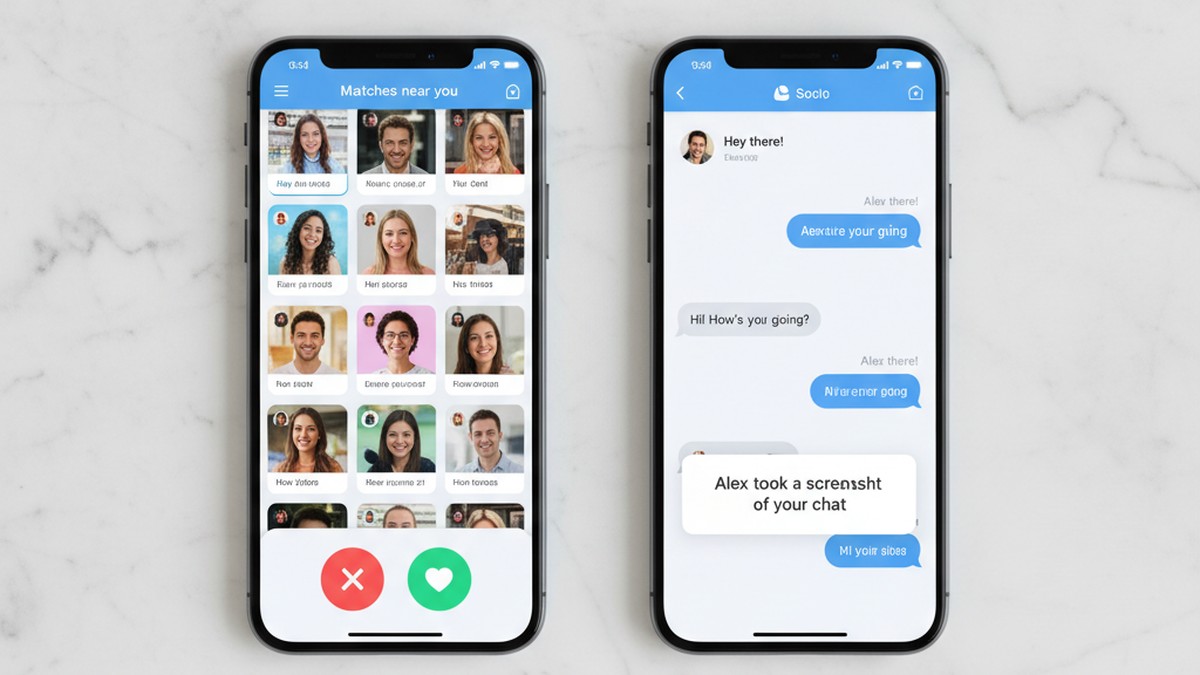
Tinder does not notify screenshots. When you capture someone's profile, photos, or messages on Tinder, no alert reaches the other person — no push notification, no read receipt, no in-app indicator. This applies to every Tinder subscription tier, on every device, as of 2026.
But the real question isn't just whether Tinder notifies. It's why it doesn't, which apps actually do send alerts, and what Tinder is tracking while everyone worries about screenshots. According to a 2025 Pew Research study, 46% of online daters have experienced a negative privacy or safety incident. Screenshot notifications are the least of those concerns.
This guide covers the technical reality of how screenshot detection works (and why Tinder opts out), a full comparison of which platforms do and don't notify, what Tinder's community guidelines actually say about sharing screenshots, and the privacy issue most articles on this topic miss entirely. By the end, you'll have a clear picture of where the real risk lives on Tinder — and it's not where most users focus their attention.
Does Tinder Notify You When Someone Takes a Screenshot?
No. Tinder does not send screenshot notifications to any user — not when you screenshot a profile, a conversation, or any other part of the app. This applies to every account tier: free, Gold, Platinum, and Tinder One. There is no detection system, no alert, and no in-app indicator of any kind when a screenshot occurs.
This holds true whether you use a standard screenshot (power + volume down on Android, side button + volume up on iPhone), a screen recording, or a third-party capture tool. The moment you take the screenshot, it saves to your camera roll. Tinder's servers receive no signal. The other person's phone receives no notification.
Many people assume Tinder tracks this somehow — through a background API call or some kind of image-detection process. It doesn't. Screenshot capture happens at the operating system level, not inside the app. An app can only know a screenshot occurred if the OS explicitly notifies it, and that only happens when the developer builds in a specific listener and response. Tinder has never done this, across any version of the app.
You can screenshot the following without triggering any notification:
- Profile photos, including all secondary images
- Private gallery photos you've been given access to by a match
- Bio text, interests tags, and personal information
- Full chat conversations and individual messages
- GIFs, photos, or videos sent within a conversation
- Video call screens
- Profile previews in the match queue
The person you screenshot doesn't know. Tinder doesn't know. Your device is the only place the image exists.
What This Means in Practice
The no-notification policy has real-world implications that go beyond the obvious. Most people understand it means they can screenshot freely. Fewer think through what it means for them on the receiving end.
Your Tinder profile is visible to every person you match with — and potentially visible during brief periods of profile discovery before a match is established. Anyone in that position can screenshot your photos, your bio, your listed interests, your distance indicator, and your linked social media handles (if you've connected Spotify or Instagram). This happens with no record, no trace, and no way for you to know it occurred.
Private photo sharing operates the same way. When you grant a match access to your private gallery and they screenshot those photos, the access log shows they viewed your photos. It doesn't show that they saved them. After you revoke access or unmatch, the screenshots remain on their device indefinitely.
This also applies to conversations. A message you send in the early stages of matching can be screenshotted and held indefinitely, regardless of what happens to the conversation or the match afterward. Unlike some other messaging platforms, Tinder has no message deletion feature that removes content from both parties' devices simultaneously. What you send is permanent in the sense that the recipient can capture and keep it.
Why This Question Gets Asked So Often
The confusion is understandable. Snapchat built screenshot detection into its core identity more than a decade ago, and an entire generation of app users absorbed the assumption that notification is standard. It isn't. Snapchat is the outlier, and its approach is tied to specific business logic — ephemeral content only works if sharing it is visibly penalized.
There's also a substantial group asking this question for practical reasons: people who suspect their partner is active on Tinder and want to document what they find. If that's your situation, understanding that screenshots are undetectable matters. You can capture what you find without triggering a confrontation before you've gathered enough information to act on it. CheatScanX scans all of these platforms — and more — in a single search, which is often faster than manual screenshots.
A third group worries about their own profile being captured without their knowledge. That concern is legitimate. Anyone who matches with you — or in some cases, anyone who encounters your profile — can screenshot it without leaving a trace. This is exactly why understanding Tinder's rules about sharing screenshots is more important than knowing whether they can take them. That's covered in detail below.
CheatScanX scans all of these platforms — and more — in a single search. Enter a name, email, or phone number and get results in minutes.
Try a multi-platform search →How Screenshot Detection Actually Works — and Why Tinder Opts Out
Screenshot detection isn't technically impossible. Several platforms do it. Understanding how the technology works explains why Tinder has made the deliberate choice not to implement it.
How Android Handles It
On Android, apps can listen for screenshot events through the `ScreenCapture.OnScreenCaptureCallback` API, introduced in Android 14 as a clean, standardized method. On older Android versions (13 and below), developers used a `ContentObserver` watching the `MediaStore` for newly written files matching screenshot naming conventions. Both approaches give apps a near-real-time signal that a screenshot occurred.
When an app implements this callback, it can immediately respond — sending a push notification to the other user, flagging the account, logging the event, or displaying an in-app warning. The callback is reliable on stock Android. It becomes less reliable on heavily modified OEM builds and rooted devices.
How iOS Handles It
On iOS, Apple provides `UIScreen.captureDidChangeNotification`, a notification that fires when screen capture begins or ends. Apps can subscribe to this event and run response code within milliseconds of a screenshot being taken. Before this API was standardized, developers used the `UIScreen.isCaptured` property to poll for active captures.
Apple also provides content protection APIs that apps can apply to individual views. When enabled, protected content appears blacked out in any screenshot or screen recording — the same protection you see in banking apps when you try to capture a transaction view.
Why Tinder Doesn't Use Either
Both mechanisms are available. The question is why Tinder hasn't built them in. Three reasons explain the decision:
Engineering priority: Building robust, cross-platform screenshot detection requires ongoing maintenance as OS versions change. Tinder's engineering resources have consistently gone elsewhere — into the matching algorithm, video features, and monetization tools. Screenshot detection has never been a stated product priority.
User experience trade-off: Detection systems create anxiety and behavioral change. When users know screenshots might be flagged, they interact more carefully — reviewing profiles quickly, not lingering, not sharing moments with friends. That chilling effect on natural engagement conflicts with Tinder's goal of keeping users active in the app.
Incomplete protection: Both Android and iOS detection systems have meaningful gaps. Screenshots taken by a second device aimed at the screen aren't detectable. Third-party apps operating at the system level may bypass callbacks. Screen captures taken through accessibility tools or ADB debugging leave no trace. Implementing detection creates a false sense of security without delivering actual protection.
One important distinction: apps can block screenshots more reliably than detect them. Android's `FLAG_SECURE` flag blacks out any screen capture attempt on protected views. iOS has equivalent content protection APIs. Banking apps and healthcare platforms routinely use these. Tinder has deliberately chosen not to. Every piece of content in the app remains fully capturable, with no technical barrier at all.

Can Tinder Detect Screen Recording?
No. Tinder doesn't detect screen recording any more than it detects screenshots. Both iOS and Android allow screen recording at the system level, and unless an app implements specific protection — which Tinder doesn't — recording happens invisibly. The person being recorded receives no notification and has no way to know it happened.
Screen recording differs from screenshots technically — it's a continuous capture stream rather than a single frame event. Some apps that implement screenshot detection don't catch recordings, and some that block recordings don't catch screenshots. Tinder does neither.
On iOS, the native screen recording feature is accessible through Control Center (swipe down, tap the recording button). It captures everything on screen from the moment you start it until you stop. Tinder receives no notification before, during, or after. On Android, the built-in screen recorder (available natively since Android 10, and earlier on Samsung, OnePlus, and other OEM devices) operates identically — system-level capture, no app signal.
Third-Party Recording Apps
Tools like AZ Screen Recorder, DU Recorder, and their equivalents operate at the same system level as the built-in recorders. None of them produce signals visible to Tinder. Recordings made through these tools are indistinguishable from recordings made through the native system recorder, and both are invisible to the app being recorded.
This means someone can record an entire Tinder conversation, scroll through every profile photo on your account, or capture a video call in real time — with no indication reaching you or Tinder. The recording lives only on their device.
What About Tinder's Video Call Feature?
Tinder's in-app video feature, Tinder Face to Face, has the same absence of detection as the rest of the app. Screen recording a Tinder video call produces no notification to the other participant. This is distinct from Apple's FaceTime, where the iOS operating system itself (not the app) notifies participants when a screen recording begins. Tinder calls are built in-app and don't benefit from FaceTime's OS-level protection.
The Screen Recording Misconception
A pattern observed through CheatScanX user behavior is worth noting here: people gathering evidence of a partner's Tinder activity often choose screen recordings over screenshots, motivated by a belief — incorrect, as this guide makes clear — that screenshots are somehow riskier or more detectable. Both methods are equally invisible to Tinder. The choice between them should come down to what you're trying to document, not fear of detection.
Which Dating Apps Actually Notify Screenshots?
The comparison below reflects platform behavior as of May 2026. Screenshot policies change, so verify with each app if you need certainty about current behavior.
| App | Profile Screenshot | Chat Screenshot | Screen Recording | Notes |
|---|---|---|---|---|
| Tinder | No notification | No notification | No notification | No detection of any kind |
| Bumble | No notification | Notification sent | No notification | Chat-only, not profile photos |
| Hinge | No notification | No notification | No notification | No detection of any kind |
| OkCupid | No notification | No notification | No notification | No detection |
| Match.com | No notification | No notification | No notification | No detection |
| Grindr | No notification | No notification | No notification | No detection |
| Plenty of Fish | No notification | No notification | No notification | No detection |
| Feeld | No notification | No notification | No notification | No detection |
| Snapchat | N/A | Yes | Partial | Most aggressive detection; notifies for snaps, chats, and stories |
| No notification | View Once only | Partial (Stories) | Notifies only for View Once messages in DMs | |
| No notification | View Once only | No notification | Only View Once photos and videos trigger notification |
Bumble's partial exception deserves attention. When you screenshot a Bumble chat conversation, the other person sees a notification: "Screenshot taken." This applies specifically to the chat interface. Screenshotting a Bumble profile — the photos and bio page — produces no notification. The asymmetry catches users off guard, since most people assume either everything or nothing triggers alerts.
Snapchat stands alone as the only widely-used platform with aggressive, app-wide screenshot detection across its core content types. Even so, Snapchat detection has been bypassed by airplane mode screenshot methods, by photographing the screen with a second device, and by certain third-party tools. No implementation is airtight.
Why most dating apps don't notify: The calculation comes down to user experience and technical investment. Dating apps built on authentic connection — Hinge markets itself as "designed to be deleted," Tinder on spontaneous matching — would create anxiety and friction if users knew their every scroll was potentially being captured. The engineering cost is real, the protection is partial, and the product trade-off isn't worth it for platforms whose core value is casual, low-stakes browsing.
For a broader view of which apps are specifically chosen for their lower detection capabilities, the guide to apps cheaters use to hide conversations covers the communication platforms most commonly used for covert dating activity and why each one gets chosen.
What Does Tinder Actually Track About You?
Here is the uncomfortable reframe: Tinder doesn't track your screenshots, but it tracks nearly everything else. The anxiety around screenshot notifications is largely misplaced. The real data collection happening on the platform is far more extensive than most users realize.
According to Tinder's current privacy policy (updated April 2026), the platform collects:
Profile data: Name, age, gender, sexual orientation, photos, bio, listed interests, and any other information you voluntarily provide. This includes data inferred from your profile — interests you didn't explicitly state but that match patterns Tinder's systems detect.
Usage data: Which profiles you view and for how long, your swipe patterns (right, left, and super-like rates), response rates in conversations, message open times, and session frequency. Tinder tracks not just what you do but how you do it — hesitation patterns, repeat visits to the same profile, time of day activity.
Location data: Precise GPS coordinates collected while the app is active, and device-level location signals that persist beyond active sessions. Tinder's matching radius feature requires location data, but collection often extends beyond what the feature requires.
Device data: IP address, operating system version, device model, advertising identifiers (IDFA on iOS, Android Advertising ID on Android), carrier information, and network connection type.
Biometric data: Facial geometry data collected during photo verification. When you complete Tinder's ID check or photo verification process, facial scan data is captured and retained. Tinder states this data is deleted upon account closure, but it exists during the account's active period.
Inferred data: Insights derived from behavioral patterns. Tinder documents "insights and inferences generated based on the content you provide" — a broad category that can include inferred sexual preferences, relationship intentions, and socioeconomic signals.
The scale of this collection is significant. A 2024 Mozilla Foundation report on dating app privacy found that 22 of 25 major dating apps reviewed — 88% — received Mozilla's worst privacy rating. The concern isn't screenshots. The concern is what the apps do with your behavioral and biometric data internally and with third parties.
The Match Group Data Ecosystem
Tinder is one product in the Match Group portfolio, which also owns Hinge, OkCupid, Match.com, and more than a dozen other dating and social platforms. Match Group's privacy policy permits data sharing across affiliated products. A user's behavior on Tinder may inform recommendations, targeting, or data retention policies across the entire portfolio.
Match Group has disclosed data-sharing relationships with advertising partners and analytics providers. In some circumstances, data has been disclosed to law enforcement under legal process. None of this is hidden — it's documented in the privacy policy most users don't read.
This is the actual privacy picture on Tinder. You can read more about the patterns this data reveals in the dating app cheating statistics analysis, which examines what behavioral data across platforms tells us about how and why cheating happens.
Does Your Device Type Change Anything?
No. The result is the same on iPhone and Android. Both operating systems provide technical mechanisms that would allow apps to detect screenshots, but Tinder uses neither. Whether you're on an iPhone running iOS 19 or an Android device running Android 16, Tinder receives no signal when a screenshot is taken. The image saves to your local device and nowhere else.
That said, the technical methods available differ between the two platforms, and understanding those differences matters if you're evaluating whether Tinder could ever implement detection.
iPhone and iOS
On iPhone, the native screenshot method is pressing the side button and volume up simultaneously. The screen flashes and the image saves to Photos. Tinder receives nothing.
Apple's `UIScreen.captureDidChangeNotification` API would allow Tinder to detect the moment a screenshot occurs and respond in real time. This API has been available since iOS 11. Tinder has had over eight years to implement it. The absence is a product decision, not a technical limitation.
Screen recording on iPhone is equally invisible. The Control Center recording button captures everything on screen from activation to deactivation. The first time you enable it, iOS requests permission once. After that, recording starts immediately with no further prompts to the apps being recorded.
One iOS nuance: Apple's FaceTime notification system operates at the OS level and notifies FaceTime participants when recording begins. Tinder's video call feature is not FaceTime. It's an in-app implementation using WebRTC infrastructure, not Apple's calling stack. Tinder video calls carry none of FaceTime's protections.
Android
On Android, the screenshot method varies slightly by manufacturer (most use power + volume down), but the result is universal: it saves to the device, Tinder hears nothing.
Android's `ScreenCapture.OnScreenCaptureCallback` (Android 14+) and older `ContentObserver` approaches would both allow Tinder to implement detection. On Android 14+ devices, the permission required to use the callback is granted automatically — no user prompt needed. Tinder has simply chosen not to request or use this capability.
One Android-specific edge case: screenshots can be taken via ADB (Android Debug Bridge) when USB debugging is enabled. These are entirely invisible to any app. Screenshots taken through accessibility services, assistant features, or third-party launchers similarly leave no trace in any app's logs.
The bottom line: your device doesn't change the outcome. What matters is whether the app has chosen to build detection — and Tinder hasn't.
What Tinder's Community Guidelines Say About Sharing Screenshots
Taking a screenshot on Tinder is not a policy violation. Sharing that screenshot publicly often is.
Tinder's community guidelines include an explicit provision on consent: "Don't post images or private messages from other people unless you've been given consent to do so." The guidelines add: "While it's okay to talk to your friends and family about people you are meeting, don't publicly share someone else's information."
This creates a meaningful distinction that most guides on this topic miss entirely.
What Is and Isn't Allowed
Private sharing: Showing a friend a screenshot on your phone, sending it in a private message, or describing a conversation to someone in your life. Tinder has no mechanism to detect or restrict any of this. It is not addressed in the guidelines as prohibited.
Public sharing: Posting someone's profile photo, bio, or messages on Reddit, Twitter, TikTok, Instagram, a public forum, or any other publicly accessible platform. This is explicitly prohibited. If the person whose content you shared sees it and reports you to Tinder, the consequences are real — typically a warning first, then a temporary suspension, then a permanent ban for repeated violations.
Sharing for harassment or targeting: Using a screenshot as part of a coordinated harassment campaign, to publicly shame someone, or to post alongside false claims. This is prohibited under both Tinder's community guidelines and the terms of service of every major social media platform, and may have legal consequences depending on jurisdiction.
How Tinder Enforces This
Tinder's moderation is reactive rather than proactive. The platform doesn't actively monitor the internet for screenshots of its content. Enforcement is triggered by reports from affected users. If someone sees their profile posted without consent, they can report both the Tinder account of the person who shared it and the post itself on the platform where it appeared.
Practical enforcement speed depends on how active the affected user is and whether the content is clearly identifiable. Many violations go unreported and therefore unenforced. But the policy is unambiguous: public sharing without consent violates Tinder's terms, and violations that get reported carry real account consequences.
The absence of technical prevention doesn't mean the absence of consequences. It means the deterrent is ethical and social rather than technical.
The Legal Side: Is It Legal to Share Tinder Screenshots?
Nothing in this section is legal advice. Laws vary significantly by jurisdiction, and the only way to understand your specific situation is to consult a licensed attorney in your location. What follows is a general orientation to the legal frameworks that apply.
Privacy Laws
In the European Union and UK, GDPR gives individuals rights over personal data, including photographs. Publishing someone's personal information or images without a legitimate basis can constitute a data protection violation, with complaints handled by national data protection authorities.
In the United States, a patchwork of state laws applies. California's CPRA, Virginia's CDPA, Colorado's CPA, and more than a dozen other state-level privacy laws create varying rights and obligations. None of them prohibit taking screenshots privately, but publishing personal information at scale may engage certain provisions depending on purpose and context.
Non-Consensual Intimate Image Laws
If a screenshot includes intimate content — partial nudity, sexual imagery, or suggestive photos shared in a private context — dedicated laws apply in at least 49 US states, the UK, Canada, Australia, and dozens of other countries. These laws specifically target the non-consensual distribution of intimate images and can carry criminal penalties, civil liability for damages, and mandatory content removal orders. The threshold varies by jurisdiction, but content that would be considered intimate in context (even if not explicit) can fall under these protections.
Defamation
Using a screenshot to make false factual claims about someone — presenting doctored content as real, or placing accurate content in a false context — can constitute defamation. The standard for what counts as defamatory varies by jurisdiction, but screenshots published alongside false statements or designed to mislead about someone's character are a clear risk area.
Harassment and Anti-Stalking Laws
Using screenshots as part of a coordinated campaign to harass, intimidate, or stalk someone can fall under harassment and anti-stalking statutes even when individual images are technically unprotected. The pattern of conduct matters as much as any single piece of content.
A practical rule that requires no legal expertise: if the screenshot contains someone else's image and you're considering publishing it anywhere public, assume there is legal risk. The exact risk depends on what was captured, where you share it, and whether the subject pursues action. The risk is rarely zero.
The Screenshot Awareness Gap: Three Levels of Privacy
Most people think about screenshot privacy as a binary question: does the app notify or doesn't it? That framing collapses three distinct levels into one, which produces bad reasoning in both directions.
The Screenshot Awareness Gap is a framework for separating what actually happens at each level.
Level 1: Technical Detection
What can the app detect at a code level? On Tinder, the answer is: nothing. There is no API call, no log entry, no server-side signal when a screenshot occurs. Your capture is invisible to the platform and to the other user's device. At Level 1, you have complete invisibility.
This is what most guides on this topic cover, and then stop. But stopping here produces a distorted picture.
Level 2: Platform Policy
What does the platform say you're allowed to do? Tinder doesn't detect screenshots, but it maintains explicit rules about sharing them. Taking a screenshot is allowed. Publishing it publicly without consent is not. Level 2 is about terms of service, community standards, and human-powered enforcement — not code. The platform can't see the screenshot, but it can respond to reports after the fact.
Many users implicitly reason: "Tinder can't detect it, therefore I can do it freely." That reasoning ignores Level 2 entirely.
Level 3: Community and Legal Consequence
What happens in the real world? A publicly shared screenshot can result in social backlash, platform account bans, content removal, and in serious cases, civil or criminal legal action. These consequences operate entirely outside the platform and have nothing to do with what Tinder can technically detect.
The most common error made on both sides of this topic: confusing Level 1 (pure technical detection, which Tinder doesn't do) with Level 3 (real-world consequences, which can be substantial). People who worry that Tinder will "catch" them taking a screenshot misplace the risk at Level 1. People who share screenshots publicly because "Tinder didn't catch them" ignore that enforcement happens at Level 3.
Clean decision-making about screenshots on Tinder requires holding all three levels distinctly. The screenshot itself is invisible. The use of that screenshot is not.
Applying the Framework to Common Scenarios
Scenario 1: You screenshot your partner's Tinder profile to document your suspicion. Level 1: invisible. Level 2: private documentation is not prohibited. Level 3: how you use that screenshot next determines the consequences. Taking it is unproblematic. Sharing it publicly to damage their reputation creates risk at all levels.
Scenario 2: Someone screenshots your profile and shares it on a public subreddit with your name and employer. Level 1: Tinder couldn't detect the screenshot and doesn't know it happened. Level 2: They violated Tinder's community guidelines by sharing publicly. Level 3: You can report to both Tinder and Reddit, the content can be removed, and depending on what was said alongside the screenshot, you may have a defamation claim.
Scenario 3: You screenshot a conversation as personal documentation — to remember what was said, to show a friend, or to keep a record. Level 1: invisible. Level 2: private sharing with friends is not prohibited. Level 3: no real-world consequence emerges from keeping a record of a conversation you were part of.
The framework doesn't tell you what to do in these scenarios. It tells you which level each concern lives at, so you're not confusing "Tinder won't catch me" with "there's no risk at all."
How to Protect Your Own Tinder Profile from Screenshots
You can't prevent someone from screenshotting your Tinder profile. Tinder doesn't give you that control, and even if it did, the technical protection is imperfect. What you can do is make thoughtful choices about what you expose.
Control What's in Your Photos
Background details are identifiable: Your home exterior, workplace signage, gym branding, street-level landmarks, and recognizable neighborhood features are all visible in photos and can be used to locate you. Screenshots preserve this information indefinitely. Before posting photos, check what appears in backgrounds.
Unique photos are reverse-searchable: If you use the same photos on Tinder that appear on your Instagram, Facebook, LinkedIn, or any other indexed platform, a reverse image search using your Tinder screenshot will connect your profile to those accounts. Photos exclusive to Tinder — ones not used anywhere else — break that chain.
Private gallery sharing carries risk: Tinder allows sending private photos directly to matches. Those photos can be screenshotted even if you later revoke access or unmatch. Consider private gallery content permanent once shared.
Use Tinder's Existing Controls
Discovery settings: Turning off "Show Me on Tinder" in the Discovery settings makes your profile invisible to new swipes. Existing matches can still see your profile, but you stop accumulating new exposure.
Blocking: Blocking a specific user removes the match and prevents them from finding your profile in future Discovery results. It doesn't retroactively remove screenshots they may have already taken.
Profile photo choices: Some users opt for photos where their face isn't the primary identifier — images where context, setting, and profile text confirm identity, but a standalone screenshot would be harder to use for reverse image search or harassment.
What Actually Reduces Risk
The most effective privacy measure on Tinder isn't technical — it's selective sharing. Sharing less information about your location, employer, and daily routine reduces the harm that can come from an unwanted screenshot. The screenshot itself isn't the problem. What someone can do with the information in it is.
If you want to know whether your own information has been found or shared on Tinder, the methods for how to search Tinder without an account can help you see what appears publicly under your own name or photos.
What to Do If Your Screenshots Were Shared Without Consent
If screenshots of your Tinder profile appear publicly without your permission, you have specific options. Acting quickly matters, because content removal is easier while posts are recent and before they've been re-shared.
Document First, Then Report
Before filing any report, capture your own evidence. Screenshot the page where your content appears, record the URL, note the date and time, and save any identifiers of the account that shared it. Once you submit a removal request and the content comes down, the documentation is gone. Collect it first.
Report to Tinder
Use Tinder's in-app reporting tools or contact support through their help center. Reference the specific community guideline provision: sharing user content publicly without consent is prohibited. Tinder can take action against the account that shared your content, including permanent removal and device-level bans that prevent account recreation.
Report to the Platform Where Content Appears
Reddit, Twitter, Instagram, TikTok, and Facebook all have dedicated non-consensual image reporting pathways, separate from general content moderation. The process varies by platform but most handle clear violations within 24 to 72 hours. If the content qualifies under non-consensual intimate image policies, these platforms are legally obligated to act quickly in many jurisdictions.
Reverse Image Search Yourself
Google Images, TinEye, and dedicated reverse image search services allow you to upload your own photo and find where it appears online. Running searches on your Tinder profile photos will surface any public uses you weren't aware of. Do this periodically if you're concerned about ongoing sharing.
When to Consult an Attorney
If the sharing is part of a harassment campaign, includes intimate content, or is being used to make false claims about you, a letter from an attorney often produces faster removal than a platform report alone. Many attorneys who handle digital privacy and cyber harassment cases offer initial consultations. If the situation is serious, legal intervention is faster and more reliable than waiting for platform moderation queues.
Search Engine Removal Requests
If your profile or images have been indexed by Google, you can submit a content removal request through Google's legal removal tools. Google maintains a database of content removal requests and will delist content that violates privacy laws in relevant jurisdictions — particularly intimate images shared without consent. Bing and other search engines have similar processes. Removing content from the hosting platform doesn't automatically remove cached search engine results, so this step is worth taking separately if the content has been indexed.
Google's removal process typically takes two to four weeks for standard privacy requests. Intimate image removal is treated as urgent and usually processes faster, often within days. After approval, the content is removed from Google's index but the original post must still be separately removed from wherever it was hosted.
What to Do if the Person Shared It Anonymously
Anonymous sharing complicates removal but doesn't prevent it. Most platforms can identify posting accounts even when usernames are pseudonymous. You can still report the post using its URL — you don't need to identify the poster to trigger platform-level removal. If you suspect you know who it is and the situation escalates to potential legal action, an attorney can help pursue account identification through proper legal channels, including platform subpoenas where applicable.
Using Screenshots as Evidence of a Partner's Tinder Activity
If you've found what you believe is your partner's active Tinder profile, taking screenshots is a reasonable first step. Understanding how to do it effectively — and what limitations apply — matters before you act on what you find.
What Makes Screenshot Evidence Stronger
A single profile photo with a name is weak documentation. It could theoretically be an old profile, a mistaken identity, or someone using a similar photo. The following details, captured together, create a much clearer picture:
- Profile name and primary photo together — one screenshot showing both, with no ambiguity about which profile you're viewing
- Bio text in full — the bio often contains specific phrasing, personal details, or humor that would be recognizable
- Preference settings — if visible, "looking for: something casual" or other stated intentions add important context
- Multiple gallery photos — particularly any photos that exist on known accounts (where the same image is used)
- Distance or activity indicator — the distance shown on a Tinder profile is calculated from the user's current or recent location; capturing it confirms active location tracking
- Conversation history — if you've had prior contact on the app, screenshots of those messages add a second layer of documentation
The Limitations of Screenshot Evidence
Screenshots prove someone's profile exists. They don't prove the profile is currently active, when it was last used, or what the intent behind it was. Human behavior is complex, and documented profiles don't automatically explain themselves.
A profile created before a relationship began might still appear in the system without recent logins. A profile reactivated during a relationship breakup and then forgotten about might show up months later. These alternative explanations don't make the discovery less worth investigating — they mean screenshot evidence is a starting point, not a conclusion.
For investigation methods that go beyond screenshots, finding hidden dating apps on your partner's phone covers how to identify whether apps are installed and active at the device level. The guide to signs your husband is cheating on his phone outlines behavioral patterns that contextualize digital evidence within real-world behavior.
When and How to Use Screenshot Evidence in a Conversation
How you use screenshot evidence matters as much as what you capture. A few considerations before you raise it:
Timing: Confronting someone with a screenshot the moment you find their profile gives them maximum opportunity to dismiss it as old, inactive, or a misidentification. Taking time to gather corroborating context — multiple screenshots over different days, a distance indicator that shows current location, or messages from a recent timeframe — makes the evidence harder to dismiss.
What to ask for, not just show: Screenshots are documentation, not interrogation. Showing a screenshot and asking "is this you?" gives the other person full control of the narrative. Asking open-ended questions first — "have you been using any dating apps recently?" — and then presenting screenshots if the answer is inconsistent is often more informative.
Keeping the original: Send yourself the screenshots via email or save them in a cloud backup before a difficult conversation. If a phone is grabbed, damaged, or reset during a confrontation, you want copies that exist independently of that device.
What screenshots can and can't establish: A screenshot of a Tinder profile shows the profile exists. Combined with a distance indicator that places the profile in the same city, a specific bio written in a recognizable voice, and photos that match known images of a person, it builds a case. Presented alone, a screenshot invites doubt. Build context before you act on what you find.
Conclusion
Does Tinder notify screenshots? No — and based on everything known about the platform's product priorities, technical architecture, and user experience calculus, that's unlikely to change.
The screenshot question, while practical, points at the wrong target. Tinder's real privacy story is in its behavioral data collection, its location tracking, its biometric storage, and the data flows between Match Group's portfolio of products and third-party advertising partners. These are data streams you can't block, can't screenshot, and can't opt out of while using the service. According to the Mozilla Foundation's 2024 review, 88% of dating apps received their worst privacy rating — not because screenshots aren't detected, but because of what these platforms actively collect.
For people worried about their own profile: calibrate your exposure. Use exclusive photos, limit background identifiers, and know that Tinder's community guidelines give you a reporting mechanism if your content ends up somewhere publicly without your consent. The technical barrier doesn't exist, but the policy and legal protections do.
For people documenting a partner's activity: screenshots are private, untraceable to the app, and legally unproblematic to keep for personal documentation. The considerations begin when you decide what to do with what you've found — not when you take the screenshot itself.
Screenshot detection is the wrong question. The right question is how you use the information Tinder holds — and how Tinder uses the information it holds on you.
If manual screenshots feel too slow or incomplete, CheatScanX scans Tinder and 14 other platforms simultaneously — returning whether an active profile exists without requiring you to find it yourself.
Frequently Asked Questions
No. Tinder has no screenshot detection system of any kind. Whether someone captures your profile photos, your bio, or your full message history, you receive zero notification. This is true on all devices and all subscription tiers. The only way someone could know you took a screenshot is if you showed them directly.
Bumble sends an alert when someone screenshots a private chat, but not for profile photos. Snapchat notifies for almost every type of capture. Most other dating apps — Hinge, Tinder, OkCupid, Match, and Grindr — send no screenshot notifications at all. The lack of any notification is the standard across the dating app industry.
Taking screenshots privately is not a Tinder policy violation. Tinder's community guidelines do prohibit sharing another user's photos or private messages publicly without their consent. Posting someone's profile on social media or a forum without permission can result in warnings, account suspension, or a permanent ban if the affected user reports it.
Yes. Tinder doesn't use Apple's UIScreen capture notification API, so taking a screenshot on iPhone produces no alert to the other person. The same is true on Android. The image saves locally to your device only. Tinder's servers receive no signal, and neither the app nor the other user gets any notification.
No. Tinder's in-app video call feature has no screenshot or recording detection. You can screenshot or screen-record a Tinder video call without the other participant being notified. Note that this is different from FaceTime, where Apple's own OS notifies participants. Tinder video calls are built in-app and have no equivalent system.