
# Match.com Profile Search Without Joining
Match.com profile search without joining is possible — three methods work with no account at all, and three more require only a free registration that costs nothing and takes three minutes. If you're trying to find out whether a specific person is on Match.com, you have more options available than most guides describe.
Match is the oldest major dating platform in the world, having launched in 1995. Today it operates with 5.8 million active users across approximately 75 million registered accounts (Business of Apps, 2026). That ratio matters: far more accounts exist than active users, which affects how you interpret any profile you find. Understanding the platform's structure before you search makes the results you get far more useful.
This article covers six methods for searching Match.com profiles, organized from no-account-required to third-party scanning tools. You'll also find a structured framework that tells you which method to try first, when to escalate to the next layer, and what realistic success rates look like at each stage. One approach in this article finds profiles that Google-based searches consistently miss — because it bypasses external indexing entirely.
Can You Search Match.com Profiles Without Joining?
You can search Match.com profiles without joining using three free methods: Google site search (site:match.com), Match's public search page, and reverse image search. None gives full profile access. For that, you need a free Match account — which requires no credit card and takes under three minutes to create.
The honest answer is more nuanced than a simple yes or no. Match.com restricts most of its profile data to logged-in users. This is intentional: the platform's business model depends on registration, so full browsing access requires at minimum a free account. However, three avenues bypass that requirement:
- Google's site-specific search operator surfaces any Match profiles that Match has allowed to be externally indexed
- Match's own public search page lets you apply basic demographic filters without logging in, returning partial results
- Reverse image search locates a Match profile if the photo you have appears on the person's public Match account
Each of these three methods has real limitations. The Google approach only finds profiles not protected by privacy settings. Match's public page shows demographics but not full profile content. Reverse image search requires having a photo and only works if that photo is publicly indexed on Match.
If you need to confirm definitively whether a specific person has a Match.com account, the most reliable path uses either a free Match account (covered in Method 3) or a third-party platform scan. The no-account options are a starting point, not a guaranteed endpoint.
CheatScanX scans all of these platforms — and more — in a single search. Enter a name, email, or phone number and get results in minutes.
Try a multi-platform search →Why Do People Search Match.com Without an Account?
People search Match.com without an account for three distinct reasons: verifying whether a partner is active on the platform, evaluating Match before deciding to register, and running identity or background checks on someone they met elsewhere. Each situation calls for a different search approach, and knowing your reason shapes which method is worth your time.
People search Match.com profiles without registering for three distinct reasons. Knowing which applies to you shapes which method is actually worth your time.
Relationship Verification
The most common reason is relationship-related. A partner has claimed to have deleted all dating apps, or to never have been on them, and something doesn't add up. Match occupies a specific demographic niche that makes this concern particularly common: 48.6% of its users are aged 30-49, and 26.5% are over 50 (Business of Apps, 2026). The platform draws an older, more established demographic than swipe-focused apps, which means it's disproportionately used by people in long-term relationships.
The scale of the problem is real. A 2025 analysis by the Institute for Family Studies found that 20% of married men and 13% of married women acknowledge engaging in extramarital affairs. Separate research from Magnum Investigations found that 38% of affairs that began in 2025 started through a social media platform or dating app. Match's own user engagement data reinforces why the platform is a common point of investigation: 51% of Match.com users access the app every day (Business of Apps, 2026), meaning an active user leaves a consistent digital trail. Match.com is one of the older platforms where this happens precisely because people trust it — they've had accounts for years, they know how it works, and they may have simply never deleted an old profile when they got into a relationship.
If this describes your situation, the most effective search method is a free Match account with Hidden mode enabled. You'll understand why in Method 3.
Pre-Registration Evaluation
A second group wants to evaluate Match before deciding to join. Browsing profiles without committing to registration is a reasonable way to assess whether the platform has the right demographic, the right age range, or enough local users to be worth trying. Match designed its public search page partly for this purpose — it lets prospective members sample the pool before signing up.
Identity and Background Verification
A smaller group searches Match profiles for verification: checking whether someone they've met online is presenting the same photos and profile information across platforms, or whether a new contact is who they claim to be. This is particularly relevant in contexts like online fraud detection or catfishing investigations, where a Match profile can serve as one data point in a broader identity check.
Each of these scenarios calls for a different approach, which is why having a structured framework matters more than just trying the first method you find. The goal of the next six sections is to give you that framework.
Method 1: Google Site Search (No Account Required)
The `site:match.com` Google search operator lets you search within Match.com's indexed pages without visiting the site or logging in. It's free, it leaves no trace, and it works for any Match profile that Match has allowed to be externally indexed.
Running the Search
Open Google and enter one of these search formats:
- `site:match.com "First Name Last Name"` — most specific, use when you know their full name
- `site:match.com "First Name" "City"` — good when you know their location but not full name
- `site:match.com "First Name" "Age"` — useful for common names where location alone isn't distinctive
- `site:match.com "username"` — if you know what username they might use on Match
Google returns any Match.com pages it has indexed that match your query. The search results show the username, often a partial bio excerpt, and the profile URL. Clicking through to the full profile requires a Match login, but the search itself tells you whether a matching profile exists at all.
What you typically see in a Google snippet for a Match profile: the user's display name or username, age, location (city or region), and the first two to three sentences of their bio. That's often enough to confirm whether the profile belongs to the person you're looking for, especially if their bio contains distinctive phrasing, mentions a hobby or profession you recognize, or includes their specific age and city.
Using Bing as a Backup
Bing's indexing of Match.com pages differs from Google's. The same `site:match.com "name"` query on Bing sometimes surfaces profiles that don't appear in Google results — and vice versa. Running both searches adds 60 seconds and meaningfully increases coverage. Don't skip this step before concluding that a no-account search has come up empty.
DuckDuckGo, which uses a combination of Bing's index and its own crawler data, can also be worth checking. The results aren't always different, but when they are, they sometimes include profiles from regional Match domains that Google hasn't indexed.
Why This Method Fails
Google's site:match.com results are structurally incomplete. Match.com allows users to control whether their profile is indexed by search engines. Anyone who has enabled Hidden mode, Private Mode, or who hasn't logged in recently may not have their profile indexed — or may have their profile de-indexed after a period of inactivity.
In practice, this method works best for profiles created within the last 12-18 months by users who haven't changed Match's default privacy settings. Based on Match's demographics and usage patterns, that's a meaningful subset but not the majority of registered users. A blank search result tells you one of three things: the person isn't on Match, they've enabled privacy settings, or their profile isn't indexed. You can't tell which from the search result alone.
For profiles protected by privacy settings, you need to escalate to the free account methods. The Google search is where you start, not where you finish.

Method 2: Match.com's Built-In Public Search Page
Match.com maintains a public-facing search interface that doesn't require a login. You can apply demographic filters — age range, location, gender preference, and relationship intent — and see partial profile results without registering for anything.
The results on the public search page are deliberately limited. Match shows you enough to demonstrate that relevant profiles exist in your area without giving you the full profile data that would satisfy a specific identity search. You'll see partially obscured thumbnail photos, first names or usernames, age, and general location. Full bios, additional photos, contact options, and profile details require logging in.
When This Method Is Actually Useful
The public search page is most useful for pre-registration evaluation — the scenario where you want to see whether Match has an active user base in your city before deciding to create an account. If you're searching for a specific person, it provides very limited value. You can confirm that profiles matching a certain demographic (male, 40-45, in Austin) exist on the platform, but you can't confirm whether any specific profile belongs to the person you're looking for.
One approach that sometimes works: if you know the person's approximate age, location, and perhaps something distinctive about their profile photo, browsing the public search results and visually scanning thumbnails can sometimes surface a recognizable photo. This is slow and imprecise, but in cases where you recognize someone's face immediately, it can confirm their presence on Match without any further action.
Using Filter Combinations as an Identification Shortcut
Even with partial results, the public search page can help you narrow the field before committing to a full investigation. The key is to use the most specific filters the platform allows without login.
If you know the person's approximate age (within three to four years), their city or region, and their gender, you can often reduce a city-wide pool of results to a manageable number of thumbnails. In a mid-sized city, a filter combination like "men, 42-46, Portland, seeking women" might return 15-30 visible thumbnails. If you know what the person looks like, scanning that list takes three minutes.
The filter combination approach works better in smaller cities or suburbs than in large metros. Searching without an account in Chicago, Los Angeles, or New York returns so many results that thumbnail browsing becomes impractical. In a city with under 500,000 people, the math is more favorable — and recognizing a face in a smaller pool is feasible.
One honest caveat: Match controls how many results are shown to non-logged-in visitors and may show fewer than are actually available. The public page is a sample, not a complete census of local profiles. What you don't see may be more than what you do.
The Honest Assessment of Method 2
For identity-specific searches, the public search page is a weak method. Treat it as a preliminary check — 10 minutes of browsing thumbnail results — before moving to something more targeted. If you find something recognizable, great. If not, move to Method 3, which gives you the same interface with full access, still for free.
Does a Free Match Account Count as Joining?
A free Match account is technically joining, but it costs nothing and requires no credit card. It gives you complete search access — full profiles, photos, and name-based lookup. With Match's free Hidden mode enabled, your profile doesn't appear to anyone else while you search. The free tier takes under three minutes to create.
Technically, yes. Practically, it's the best free tool available for this search, and the concerns that make people avoid it are easily addressed within Match's own settings.
A free Match.com account requires an email address and basic profile information. No credit card. No subscription commitment. You can create one, use it for a search, and delete it the same day. Match offers the free tier because getting people in the door serves their business model — they want you to see enough to consider upgrading to a paid subscription. The free tier is functionally complete for profile browsing.
What a Free Account Gives You
With a free Match account, you can:
- Browse full profiles: photos (all of them, not just thumbnails), complete bios, stated preferences, lifestyle details, and education level
- Use name-based search: type a first name and filter by location and age to find specific profiles
- Apply advanced demographic filters: height, religion, children status, education level, ethnicity (optional), relationship goals
- See profile activity indicators (limited on free): some activity signals are visible to free members
- Use Reverse Match: see which profiles Match suggests based on your stated criteria
- View who liked your profile: a limited number of mutual likes are surfaced to free accounts
You cannot send messages, see who has read your messages, or access premium features that require a paid subscription. For the purposes of profile searching — which is the only goal here — a free account is everything you need.
The free tier gives you the same search interface as a paying subscriber. The only thing you can't do is initiate conversation.
How to Stay Anonymous While Searching
Creating a free account doesn't mean you become visible on Match. The platform offers multiple privacy controls, and using them correctly means you can search the entire platform without appearing in anyone else's search results or view logs.
Hidden mode (free): Setting your profile to Hidden removes it from Match's search results. Other members cannot find your profile while browsing. You can still search and view profiles yourself. This is the setting to use when you want to search without being visible.
Undercover mode (paid add-on): Undercover is a 24-hour session purchase — not a subscription — that lets you view profiles without appearing in the other person's "Who Viewed Me" list. This is available to existing account holders, including those on the free tier. If you want to browse specific profiles without leaving a view trace, Undercover is the mechanism for that.
The practical approach: create a free account using an email address that isn't your primary one, upload no photos initially, set your profile to Hidden immediately after registration, and search. You will appear in no one's search results. No one will see that your profile exists. You can browse every public profile on the platform freely.
This is the approach most guides overlook. Avoiding a free account because you want to "search without joining" means working with the dramatically weaker no-account methods, while the privacy concerns that motivate that choice are solved in 30 seconds within Match's settings. A free account, used with Hidden mode, is functionally equivalent to searching anonymously — and far more effective than any no-account method.

Method 4: Search by Name, Email, or Username
If you have specific information about the person — their name, a known email address, or a username they use on other platforms — several targeted search approaches work both inside and outside of Match.
Name Search Within Match (Free Account)
With a free Match account, the name search bar lets you type a first name and narrow results by location and age. Match surfaces profiles matching that name within the parameters you set. This is the fastest way to find someone specific if you know their name and approximate details.
Common names complicate this. If you're searching for "Michael" in Chicago between ages 40-50, you might get dozens of results. In that case, cross-reference profile details — job type, specific hobby mentioned in bio, or a distinctive physical detail you'd recognize from their photo — to narrow to the right person.
Uncommon names simplify the search considerably. An unusual first name combined with a city and approximate age often returns zero to three results, making identification straightforward.
The External Name Search (No Account)
For a dating profile search by name without creating a Match account, the best external approach combines Google operators:
- `"First Name Last Name" site:match.com` — direct profile match
- `"First Name Last Name" "Match.com" dating` — broader results including any public mentions
- `"First Name" "Last Name" "City" dating site` — no site restriction, catches any public references
These searches surface any publicly indexed content that connects the person's name to Match.com. This includes their own profile if it's indexed, but also forum posts, screenshots someone else shared, or profile exports from web archive tools.
The Email Verification Method
Match.com's registration flow reveals one specific piece of information about an email address: whether it's already in use on the platform. Navigate to Match.com's sign-up page and enter the email address you believe the person used. If the address is already registered, Match displays an error or a prompt indicating that address is taken and inviting you to log in.
This tells you only whether that specific email is associated with a Match account. It gives you no profile details, no username, no photos. But in many verification scenarios — particularly relationship ones where you want a yes/no answer — that confirmation is sufficient.
Important limitation: many people create dating accounts with a secondary email address specifically to avoid this kind of check. If the email you try comes back clean, it means that address isn't on Match, not that the person isn't on Match. Try multiple email addresses: their primary personal email, their work email if you know it, and any secondary addresses you've seen them use.
Username Search Across Platforms
People frequently reuse usernames across platforms. If you know the person uses a specific username on Instagram, Twitter, or another service, search for that same username on Google with `site:match.com "username"`. People who are careless about digital hygiene often use the same username across multiple accounts, including dating profiles.
People search aggregators like BeenVerified and Spokeo also conduct username cross-reference searches. These services scan social accounts, public records, and some dating platform data simultaneously. Their Match.com data may be months or years behind current status, but they're useful for establishing whether someone has ever had a Match account under a given username.
Method 5: Reverse Image Search for Match Profiles
Reverse image search works by taking a photo and scanning indexed image databases for visual matches. When applied to dating profile searches, it can surface a Match.com profile if the same photo appears on the platform's publicly indexed pages.
Tools That Work for Dating Profile Searches
Google Images: Navigate to images.google.com, click the camera icon, and upload or paste the URL of a photo. Google scans its indexed image database and returns any pages where that image appears. For a Match profile photo that Google has indexed, this will surface the profile URL directly.
TinEye: A dedicated reverse image search tool with a database exceeding 60 billion images. TinEye often surfaces older indexed images that Google has de-indexed or deprioritized in its results. Worth running in addition to Google Images rather than as a substitute for it.
Bing Visual Search: Bing's image search sometimes returns different results from Google's, particularly for dating platform thumbnails. The overlap between Google and Bing Visual Search is significant but not complete.
For a detailed breakdown of reverse image search for dating profiles, including how to handle cropped, filtered, or edited photos where exact matches may not appear, that technique extends across any platform where profile images are publicly indexed.
What Reverse Image Search Can Find
Reverse image search works when three conditions are met: you have a photo of the person, they used that same photo on their Match profile, and Match has indexed that photo externally. When all three are true, this is the fastest method available — results appear in seconds, and the output is a direct link to the profile.
The technique also catches something useful beyond Match.com: if the same photo appears on multiple dating platforms, those results surface simultaneously. You may discover that the person is active on three platforms rather than just one, which provides substantially more information than a Match-specific search would.
Checking Multiple Photo Variants
One practical improvement on standard reverse image search: run the search against multiple photos of the person, not just one. People sometimes use different photos across different platforms. A headshot they use on LinkedIn might not appear on Match, but a casual photo from a social media post might.
If you have access to three or four distinct photos — taken at different times, in different settings — run each one through Google Images and TinEye separately. The results across four searches often overlap substantially, but occasionally one photo surfaces a profile that the others miss. This is particularly relevant when the person uses professional-quality photos on some platforms and candid snapshots on others.
The marginal time investment (three to four additional searches) is low relative to the potential value, especially if earlier methods produced no result.
Limitations to Know Before You Start
This method fails when any of the three conditions above breaks down. If the person uses different photos on Match than on other platforms, or if they selected profile photos specifically because they're not indexed elsewhere, reverse image search won't cross-reference them. Match profiles set to private don't expose their photos to external indexing at all, so photos from private profiles won't appear in reverse image search results.
Additionally, photos with heavy filters, significant cropping, or deliberate alteration may not match even if the same person appears in both images. Standard reverse image search relies on pixel-level similarity; it's not face recognition.
For situations where you need face-recognition-level matching rather than pixel matching, dedicated services that use AI facial comparison provide better results, though these typically involve some cost.
Method 6: Third-Party Dating Profile Scan Tools
When no-account and free-account methods don't produce a result, the explanation is usually one of two things: the person uses a name or email you don't know about on Match, or they've set their profile to Private Mode — which removes them from general search results while allowing them to use the platform.
Third-party scan tools address the second problem by querying dating platforms directly rather than relying on external indexing or their own internal search. Instead of searching what Google knows about Match, these tools search Match itself using the parameters you provide — typically name, age, and location.
What Different Tool Types Actually Find
Not all third-party tools work the same way. Understanding the difference helps you choose the right tool for the right gap.
| Tool Type | What It Searches | Best For | Currency |
|---|---|---|---|
| People search aggregators (BeenVerified, Spokeo) | Public records + historical social/dating data | Finding past account existence | Often 6-18 months behind |
| Reverse image tools (TinEye, Google Images) | Externally indexed images | Active profiles with public photos | Near-real-time |
| Username search tools | Cross-platform username matching | People who reuse usernames | Varies |
| Direct platform scanners (CheatScanX) | Live platform search via name/age/location | Active Visible-state profiles | Real-time |
The key distinction is between tools that search historical data and tools that query platforms in real time. If you want to know whether someone has an active, current Match profile, only a real-time query gives you that answer. People search aggregators tell you about past presence, not current status.
How Direct Platform Scanning Works
A direct platform scan submits name and demographic parameters against a dating app's search function, rather than relying on externally indexed pages. This means it finds profiles that are in Visible state within Match's system — searchable by Match members — even if those profiles have never appeared in a Google result.
The coverage this provides is substantially higher than search-engine-dependent methods. An active Match profile in Visible state is reachable by a direct scan. Only profiles in Hidden mode or Private Mode (the two privacy settings that remove profiles from Match's internal search results) fall outside this approach.
The practical use of this method is most relevant when you're searching across multiple platforms simultaneously. If you're trying to determine whether someone is on Match, Tinder, Bumble, Hinge, and several other apps at once, running six separate searches manually is time-consuming. A multi-platform scan covers all of them in a single query. For more on how to find out if your partner is on dating apps across multiple platforms rather than one at a time, that context matters for structuring the investigation efficiently.
CheatScanX runs this kind of direct scan across 15+ dating platforms including Match.com. If you've worked through the earlier methods without a result, that's the next step.
How Does Match.com's Privacy System Affect Your Search?
Match.com profiles exist in three visibility states: Visible (searchable by members and sometimes Google), Hidden (paused and invisible to everyone), and Private Mode (paid, visible only to people you contact first). Visible profiles are reachable through most methods. Hidden and Private Mode profiles are effectively unreachable without a direct platform scan tool.
Match.com has three profile visibility states, and which state a profile is in determines whether any given search method can find it. Understanding this architecture tells you why some searches fail and what your realistic options are.
The Three Visibility States
| Visibility State | Who Can See the Profile | Appears in Google? | Appears in Match Search? |
|---|---|---|---|
| Visible (default) | All Match members + some public | Often yes | Yes |
| Hidden | Nobody — profile is paused | No | No |
| Private Mode (paid) | Only members you contact first | No | No |
Visible is the default for any active Match user who hasn't changed their settings. These profiles are searchable within Match by any logged-in member, and some are indexed by Google. The majority of genuinely active Match users — people logging in weekly to browse and potentially message — are in Visible state.
Hidden mode is used by people who have paused their dating search. They may be in a new relationship and haven't deleted the account yet, or they may be taking a temporary break. A Hidden profile doesn't appear anywhere: not in Match's internal search, not on Google, and not in any external scan that relies on Match's search function. A direct database scan would be required to detect a Hidden profile, and Match's privacy architecture is designed to prevent exactly that.
Private Mode is a paid Match feature that lets subscribers control their visibility profile-by-profile. In Private Mode, your profile doesn't appear in general search results — you're invisible to everyone who hasn't been specifically messaged by you. Someone actively using Match to seek connections while hiding this from a partner might use Private Mode precisely because it allows normal app use while preventing discovery through casual searching.
The Undercover Feature and Anonymous Browsing
Undercover is often confused with a way for non-members to browse anonymously. It's actually an existing-account feature. Undercover is a 24-hour session purchase — available to free account holders and subscription members — that lets you view profiles during that window without appearing in the other person's "Who Viewed Me" notification feed.
For the search strategy described in Method 3, Undercover is relevant if you've created a free account and want to browse specific profiles without leaving a view trace. Without Undercover, when you view someone's full profile while logged into Match, they'll see your account appear in their viewer history (if they check it). With Undercover active, that notification is suppressed.
The combination of a free account + Hidden mode + Undercover session gives you the most anonymous search experience available within Match's own platform, short of a no-account search — and it returns far better results.
What This Means for Your Search
If your search comes up empty using Methods 1 through 5, the most likely explanations are:
- The person isn't on Match
- They're in Hidden mode (not actively using the app)
- They're in Private Mode (actively using the app, invisible to general search)
- They registered under a different name or email than you searched
Private Mode is the hardest case to address without a direct platform scan. Someone in Private Mode is actively using Match — logging in, viewing profiles, potentially messaging people — while being completely invisible to standard search methods. This is a deliberate choice, not an accident, and it suggests awareness of the need for concealment.
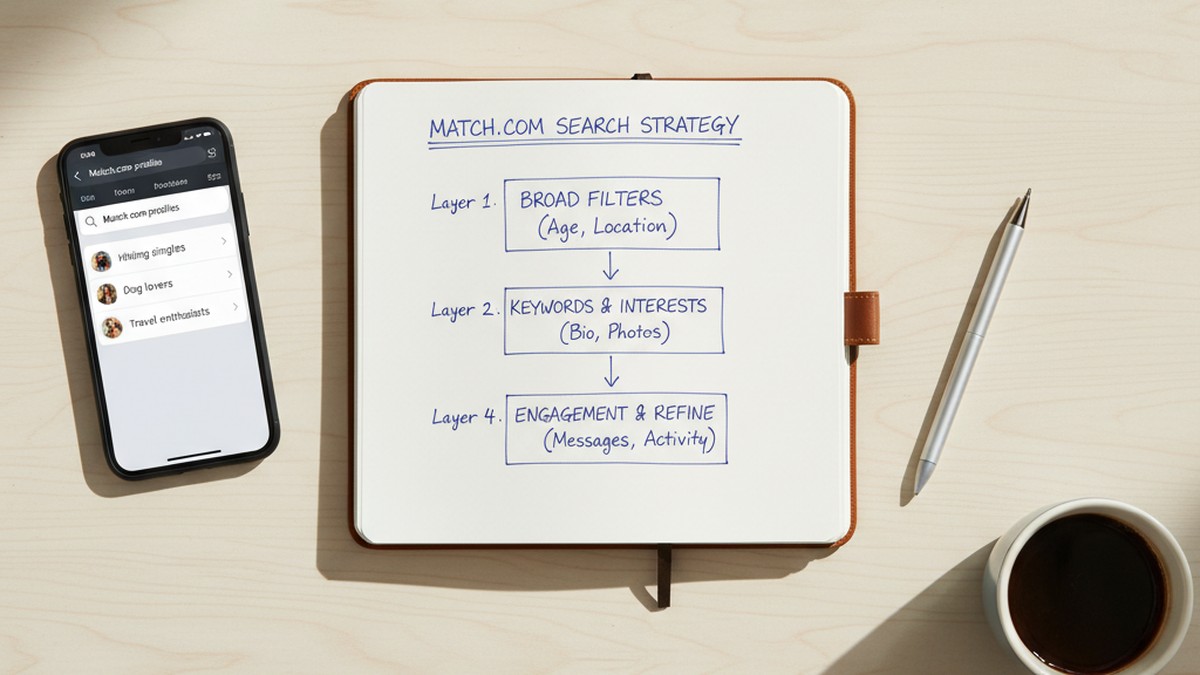
The 4-Layer Match.com Search Framework
Rather than trying one method and giving up, a structured approach to Match.com profile searching moves through layers based on effort, access required, and realistic success rate.
Layer 1: No-Account Methods (5-15 Minutes)
Run these first. They're free, fast, and leave no trace anywhere.
- Google site search: `site:match.com "name"` and `site:match.com "name" "city"`
- Bing site search: the same queries on Bing, which indexes some Match profiles Google doesn't
- Match's public search page: demographic-filter browsing without login
- Reverse image search on Google Images and TinEye (if you have a photo)
Realistic success rate: Layer 1 methods find approximately 30-40% of active Match profiles. This reflects the proportion of profiles that are both in Visible state and externally indexed, without any privacy settings engaged. It's a meaningful portion, but the majority of active users — particularly those who've been on Match long enough to have adjusted settings — won't surface through Layer 1 alone.
If Layer 1 returns a result, verify it carefully before drawing conclusions. An old profile from three years ago looks identical to an active one in a Google search result.
Layer 2: Free Account Methods (15-30 Minutes)
If Layer 1 yields nothing, create a free Match account. Set your profile to Hidden before you begin searching. This costs nothing and gives you substantially better coverage.
- Name and demographic search within Match's platform (the most direct method)
- Email verification through Match's registration page (yes/no confirmation per email address)
- Advanced filter search: combine age range, location radius, height, education, and other details to narrow from a broad pool to a manageable list
Realistic success rate: Layer 2 methods find approximately 70-80% of active Match profiles. The gap between Layer 1 (30-40%) and Layer 2 (70-80%) illustrates why the free account approach is so much more effective. The 20-30% not reached by Layer 2 are in Private Mode or Hidden mode.
Layer 3: External Search Aggregators (15-60 Minutes)
If the person may have registered under a username or email you don't know, people search aggregators sometimes hold historical data that fills the gap.
- BeenVerified, Spokeo, or Intelius: search by full name and city, cross-check with any known email addresses
- Username cross-reference: if you know a username they use elsewhere, search for it via `site:match.com "username"` on Google
- Web archive searches: the Wayback Machine (archive.org) sometimes holds cached versions of Match profiles that have since been deleted or modified
Realistic success rate: Variable and difficult to estimate. These tools are most useful for confirming historical profile existence — finding evidence that someone had a Match account six months ago, even if they've since deleted or hidden it. For confirming current active status, they're less reliable.
Layer 4: Direct Platform Scan
A direct platform scan queries Match.com's internal search using name and demographic parameters rather than relying on external indexing. This reaches profiles that are in Visible state within Match's system regardless of their Google indexing status.
This is the method that closes the gap left by Layers 1 and 2. It's also the approach to use when you need to search across multiple platforms simultaneously — which, in relationship verification contexts, is often more useful than a Match-specific search. Most of the apps cheaters use beyond Match are covered by multi-platform tools, so a single scan can answer the broader question rather than just the Match-specific one.
CheatScanX performs this type of direct scan across 15+ platforms simultaneously. If you've worked through Layers 1-3 and still don't have an answer, that's what Layer 4 addresses.
Choosing the Right Layer for Your Situation
The following table summarizes when each layer is the right starting point, rather than always beginning at Layer 1:
| Your Situation | Start Here |
|---|---|
| You have their photo and don't know their name on Match | Layer 1 (reverse image search first) |
| You know their full name and city | Layer 2 (free account name search) |
| You only know their primary email | Layer 2 (email verification via registration page) |
| Their name is common in a major city | Layer 2, then Layer 3 for username cross-reference |
| You want to check multiple dating apps at once | Layer 4 directly |
| Previous search came up empty but you're confident they're on Match | Layer 3, then Layer 4 |
Starting at the wrong layer wastes time without meaningfully improving your results. Reverse image search is useless without a photo. Name search is slow without a free account. People search aggregators don't add much when you already have a specific name and city for a free-account search. Map your situation to the starting layer before running any searches.
What Does a Match.com Profile Actually Tell You?
A Match.com profile shows the person's display name, age, general location, photos, bio, and relationship preferences. Paying members can also see a last-active timestamp. Finding a profile confirms someone registered on Match — it doesn't confirm they're currently active, since Match keeps inactive accounts live indefinitely without any time limit.
Assuming you find the profile you were looking for, interpreting what it actually means requires some care. A profile confirms account existence. It doesn't, by itself, confirm active use or current behavior.
What Profiles Contain
A standard Match profile includes:
- Display name: Usually a first name or nickname. Rarely a full legal name.
- Age: Entered during registration. Can be inaccurate by a year or two. Significant falsification is less common on Match than on younger-demographic apps because the platform has a more established, verification-aware user base.
- Location: City or region. Generally accurate, since location filters are how people find relevant matches.
- Photos: Usually current and genuine, though not always. Some users upload older photos.
- Bio: Self-written. Often revealing in tone, language, and what it emphasizes or omits.
- Relationship preferences: What they're looking for — "long-term relationship," "short-term dating," "friendship" — and their preferred partner's age range.
- Lifestyle details: Height, education, religion, children status, smoking, and drinking preferences. Match skews toward educated users — approximately 80% of its members have attended college (Business of Apps, 2026), which shapes the self-presentation norms on the platform.
- Last active indicator (visible to paying members only): Shows approximately when the person last logged into Match. This timestamp is the single most useful piece of information for determining whether a profile represents current activity.
What a Profile Doesn't Prove
Finding a Match profile doesn't confirm active infidelity, and treating it as conclusive proof before gathering more information creates problems.
Match.com has 75 million registered accounts but only 5.8 million active users (Business of Apps, 2026). That ratio — roughly 13 registered accounts for every active user — means that a substantial portion of Match profiles belong to people who registered years ago and haven't logged in since. An old, dormant account and an account used this week look identical in a basic search result.
The last-active timestamp resolves this, but only paying subscribers can see it. Without that timestamp, a profile's existence tells you that someone registered at some point. It doesn't tell you when, or whether they've logged in since.
Other caveats worth holding:
- People use Match for non-romantic reasons, including networking, curiosity about who else is on the platform, or casual browsing. This is uncommon but not impossible.
- The profile might belong to a different person with the same name and approximate demographic details. This is particularly relevant with common names in large cities.
- The bio or photos might be significantly outdated, representing a version of the person from years ago that doesn't reflect their current situation.
Document what you find — screenshots with timestamps — before taking any action. Profile details can change quickly once someone suspects they've been searched, and photos or bio text edited after the fact can alter what the profile appears to say.
For broader guidance on documenting evidence and structuring a more complete investigation, the guide on how to catch a cheater covers next steps in detail.
Common Mistakes When Searching for Match.com Profiles
The most damaging mistakes in this kind of search are the ones that lead to false conclusions — either assuming someone isn't on Match when they are, or treating an old profile as evidence of current activity.
Mistake 1: Treating a Blank Google Result as Proof of Absence
Running `site:match.com "name"` and getting no results tells you only that no matching, publicly indexed page exists for that search query. It does not mean the person isn't on Match. They may be registered under a nickname, have enabled privacy settings, or have a profile that has simply never been indexed.
This is the most common and consequential mistake. People run one Google search, see nothing, and conclude the person isn't on the platform. A blank Layer 1 result means you need to escalate to Layer 2, not stop searching.
Mistake 2: Relying on Outdated URL Shortcuts
Several widely shared guides reference specific Match.com URLs for browsing without login — URLs like `match.com/search/index.aspx` that were accurate several years ago. Match.com has restructured its URL architecture multiple times since 2020, and many of these specific paths no longer work as described.
Always navigate to Match.com's current homepage and look for the search or browsing interface rather than attempting to access a URL from an older article. If a URL from a guide returns a 404 or redirect error, that's why.
Mistake 3: Confusing Free Accounts with Paid Subscriptions
Some guides imply that finding someone on Match requires paying for the platform. This is incorrect. A free Match account provides complete search functionality, including name-based search, photo viewing, and advanced demographic filters. The paid subscription unlocks messaging and notification features — not search features. If you're searching for a profile rather than trying to contact someone, the free tier covers everything you need.
Mistake 4: Treating Profile Existence as Current Evidence
As noted above, Match's ratio of registered to active users is approximately 13:1. An old dormant profile and an active one are visually identical in a search result. Without the last-active timestamp — which requires a paying account to see — profile existence is weaker evidence than most people assume.
If you find a profile and want to determine whether it's current, look for clues within the profile itself: recently added photos (you can often tell from image quality and style differences), a bio written in present tense that mentions current circumstances, or stated preferences that align with the person's current life stage. These are signals, not proof, but they help distinguish a dormant registration from an actively maintained profile.
Mistake 5: Creating an Obviously Fake Account
Some guides suggest creating a Match account with a fabricated name, a randomly chosen photo, and fictional details in order to search anonymously. The practical risk of this approach is account suspension. Match periodically reviews accounts flagged as potentially fake — a profile with no photo, an implausible username, and demographic details that don't hold together internally raises flags in their moderation system.
An account suspended mid-search loses you access to any results you found but haven't documented. Using a real email, a real (if secondary) name, and a genuine profile photo — even with Hidden mode enabled — is safer and less likely to result in account termination during a sensitive search.
Mistake 6: Searching Only Match.com
Match is one of dozens of dating platforms in active use. Someone maintaining a profile they'd prefer a partner not to find is statistically more likely to be on multiple platforms than just one. A search limited to Match.com, even if it comes up empty, leaves the broader question unanswered. Running the same investigation across Tinder, Bumble, Hinge, and other platforms simultaneously is almost always more informative than a platform-specific search.
Conclusion
Match.com profile search without joining is genuinely possible, and three methods — Google site search, the public search page, and reverse image search — work with no account required. They find roughly 30-40% of active profiles, which means they're a starting point, not a complete solution.
The most effective approach for most use cases is a free Match account set to Hidden mode. This isn't "joining" in the sense of committing to the platform or paying anything — it's using Match's own free tier with its own privacy settings to conduct a search that reaches 70-80% of active profiles. The concerns that lead people to avoid this option are real, but they're addressed within Match's settings in under a minute.
If you've worked through both the no-account methods and the free account approach without finding what you're looking for, the remaining possibilities are that the person isn't on Match, or they're in Private Mode — actively using the platform while deliberately invisible to standard searches. A direct platform scan is the only approach that reaches profiles in Visible state that escaped the free-account search.
For relationship verification across multiple dating platforms — which is usually the more relevant question than Match.com specifically — CheatScanX scans 15+ apps including Match, Tinder, Bumble, and Hinge in a single search. That's the practical next step if a Match-specific investigation hasn't produced a definitive answer.
Frequently Asked Questions
You can run limited searches without an account using Google's site:match.com operator, Match's public search page, or reverse image search tools. These methods return partial results only. A free Match account — no credit card required — provides complete search access, including name filters, photo browsing, and advanced demographic search.
Some Match.com profiles are indexed by Google and visible to non-members, depending on each user's privacy settings. Profiles set to Hidden or Private Mode don't appear in search engines. The majority of active profiles are accessible only to logged-in members, whether on a free or paid account.
Match.com shows members who viewed their profile in the Who Viewed Me section. Browsing without an account leaves no trace. Free account holders do appear in view logs. Match's Undercover add-on lets members browse anonymously for 24-hour sessions without appearing in view logs — but it requires an existing account to purchase.
A free Match account gives you full profile browsing: photos, bios, location, age, education, and lifestyle details. You can use name search and demographic filters, see who liked your profile, and use Reverse Match. You cannot send messages or see message read receipts without a paid subscription. No credit card is required.
Search Google using site:match.com plus their name and city. Try the email verification method by entering their email on Match's registration page — if it's already registered, you'll see an error. For the most reliable result, a third-party scan tool that directly queries multiple dating platforms simultaneously covers profiles hidden from Google.